
1. Введение
This manual provides essential information for the installation, operation, and maintenance of your Intel Core i7-4790 Processor. Designed for desktop computing, this processor offers a balance of performance and efficiency for various applications, from everyday tasks to demanding gaming and content creation. Please read this manual thoroughly before proceeding with installation.
2. Информация по технике безопасности
Always observe the following safety precautions to prevent damage to the processor or other components, and to ensure personal safety:
- Предотвращение электростатического разряда (ЭСР): Processors are sensitive to static electricity. Always wear an anti-static wrist strap or frequently touch a grounded metal object before handling the processor.
- Обращаться с осторожностью: Avoid touching the gold contacts or the bottom of the processor. Hold the processor by its edges.
- Выключение: Перед установкой или извлечением каких-либо компонентов убедитесь, что ваша компьютерная система полностью выключена и отсоединена от розетки.
- Вентиляция: Обеспечьте достаточную циркуляцию воздуха внутри корпуса компьютера, чтобы предотвратить перегрев.
- Профессиональная установка: Если вы не уверены в каком-либо шаге, проконсультируйтесь с квалифицированным специалистом.

Figure 2.1: System Protection Reminder
This image illustrates the importance of protecting your computer system, emphasizing the need for careful handling and proper installation practices to ensure the longevity and security of your components.
3. Содержимое упаковки
Убедитесь, что ваш пакет содержит следующие предметы:
- Процессор Intel Core i7-4790
- Intel Stock CPU Cooler (if purchased as a boxed processor)
- Документация (например, краткое руководство пользователя, информация о гарантии)
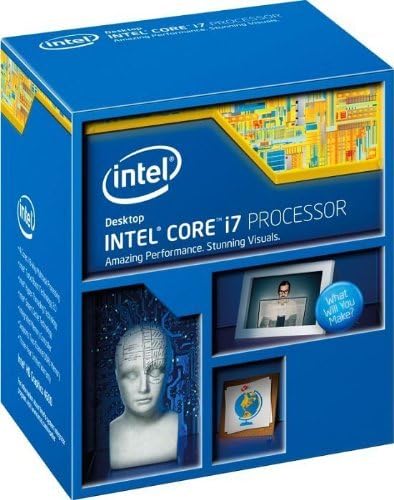
Figure 3.1: Processor Retail Box (Front)
This image displays the front of the Intel Core i7 Processor retail packaging, highlighting the brand and product line.

Figure 3.2: Processor Retail Box (Side)
This image shows the side of the Intel Core i7 Processor retail box, where the model number BX80646I74790 and UPC are visible for identification.
4. Настройка и установка
The Intel Core i7-4790 Processor uses the LGA 1150 socket. Ensure your motherboard is compatible with this socket type and supports 4th Generation Intel Core processors (Haswell refresh). A BIOS update may be required for some Z87 motherboards.
4.1 Контрольный список перед установкой
- Compatible Motherboard (LGA 1150 socket)
- Термопаста (если она не нанесена предварительно на кулер)
- Screwdriver (for cooler installation)
- Антистатический браслет
4.2 Этапы установки процессора
- Подготовьте материнскую плату: Open the CPU socket retention lever on the motherboard. Lift the metal load plate.
- Ориентируйте процессор: Carefully align the processor with the socket. Look for the golden triangle or notch on one corner of the processor and match it with the corresponding mark on the socket. Do not force the processor into the socket.
- Установите процессор: Аккуратно опустите процессор в сокет вертикально вниз. Он должен сидеть без сопротивления.
- Защитите процессор: Close the metal load plate over the processor, then push down the retention lever until it clicks into place.
- Нанесите термопасту (при необходимости): Если на вашем кулере для процессора нет предварительно нанесенной термопасты, нанесите небольшое количество (крупинкой размером с горошину) на центр встроенного теплораспределителя процессора (IHS).
- Установка кулера для процессора: Mount the CPU cooler according to its specific instructions. Ensure it makes firm, even contact with the processor's IHS.
- Подключите вентилятор охлаждения: Connect the CPU cooler fan cable to the designated CPU_FAN header on the motherboard.

Figure 4.1: Intel Core i7-4790 Processor
На этом изображении показана верхняя часть. view of the Intel Core i7-4790 Processor, illustrating its physical appearance and branding, which is crucial for correct orientation during installation.
5. Эксплуатация процессора
Once installed, the Intel Core i7-4790 Processor operates automatically within your system. Its performance is managed by the operating system and motherboard BIOS/UEFI settings. Key features include:
- Технология Intel Turbo Boost 2.0: Dynamically increases the processor's frequency as needed by taking advantage of thermal and power headroom to deliver a burst of speed when you need it.
- Технология Intel Hyper-Threading: Allows each processor core to work on two tasks at the same time, improving multitasking performance.
- Графический адаптер Intel HD Graphics 4600: Integrated graphics solution for display output and light graphics tasks.
- Технология виртуализации Intel (VT-x): Enables one hardware platform to function as multiple "virtual" platforms, offering improved manageability, security, and flexibility.
For optimal performance, ensure your operating system and drivers are up to date. Adjusting power management settings in your operating system or BIOS can also influence processor behavior and power consumption.
6. Техническое обслуживание
Processors generally require minimal maintenance. The primary focus should be on maintaining an optimal operating environment:
- Удаление пыли: Regularly clean dust from your computer case, especially from CPU cooler fins and fans, to ensure efficient heat dissipation. Use compressed air for this purpose.
- Термопаста: Если по какой-либо причине вы снимаете кулер ЦП, рекомендуется очистить от старой термопасты как ЦП, так и основание кулера и нанести свежую термопасту перед повторной установкой.
- Мониторинг температуры: Use system monitoring software to keep an eye on CPU temperatures, especially under heavy load, to ensure it stays within safe operating limits.
7. Поиск Неисправностей
If you encounter issues after installing your Intel Core i7-4790 Processor, consider the following troubleshooting steps:
- Нет отображения/нет загрузки:
- Double-check all power connections to the motherboard and CPU.
- Ensure the processor is correctly seated in its socket and the retention lever is locked.
- Verify RAM modules are properly installed.
- Confirm motherboard BIOS is updated to support the i7-4790, especially if using an older Z87 chipset.
- Перегрев:
- Ensure the CPU cooler is correctly installed and making good contact with the CPU.
- Проверьте нанесение термопасты.
- Проверьте, вращается ли вентилятор кулера ЦП и подключен ли он к правильному разъему.
- Improve case airflow by ensuring proper fan configuration and removing obstructions.
- Нестабильность системы/сбои:
- Run diagnostic tools for memory and storage.
- Убедитесь, что все драйверы (чипсета, графики) обновлены.
- Check for BIOS updates for your motherboard.
8. Технические характеристики
| Особенность | Спецификация |
|---|---|
| Номер модели | BX80646I74790 |
| Основное имя | Хасвелл |
| Количество ядер | 4 |
| Количество тем | 8 |
| Тактовая частота | 3.6 ГГц |
| Максимальная частота турбо | 4.0 ГГц |
| Интеллектуальный кэш | 8 МБ |
| ДМИ2 | 5.0 ГТ/с |
| Литография | 22 нм |
| Гнездо | ЛГА 1150 |
| Максимальная расчетная тепловая мощность (ТВП) | 84 Вт |
| Максимальная пропускная способность памяти | 25.6 ГБ/с |
| Процессорная графика | Intel HD Graphics 4600 |
| Базовая частота графики | 350 МГц |
| Максимальная динамическая частота графики | 1.2 ГГц |
| Максимальная конфигурация ЦП | 1 |
| Передовые технологии | Intel Turbo Boost 2.0, Hyper-Threading, Virtualization (VT-x, VT-d), AES New Instructions, Secure Key, OS Guard, Trusted Execution Technology |
9. Гарантия и поддержка
This Intel processor is covered by Intel's standard warranty. For specific warranty terms and conditions, please refer to the documentation included with your processor or visit the official Intel support website. Please note that opening the product or improper installation may void the warranty.
For technical support, driver downloads, and further assistance, please visit the official Intel support portal. When contacting support, have your processor's model number (BX80646I74790) and any relevant system information ready.
Важный: No refunds or returns are accepted if the product has been opened, unless due to a manufacturing defect. In the event of a return, the buyer is responsible for return shipping costs. Please contact the seller or Intel support for return authorization and procedures.