
Pioneer VSX-923-K
Pioneer VSX-923K A/V Receiver User Manual
Модель: VSX-923-K
1. Введение
This user manual provides detailed instructions for the safe and efficient operation of your Pioneer VSX-923K A/V Receiver. Please read this manual thoroughly before using the product and retain it for future reference.
The Pioneer VSX-923K is a 7.2 channel A/V receiver designed to amplify your audio and video experience, offering advanced features such as 4K Ultra HD video upscaling, high-resolution audio playback, and extensive connectivity options.
2. Важные инструкции по технике безопасности
Всегда соблюдайте основные меры предосторожности при использовании данного изделия, чтобы снизить риск возникновения пожара, поражения электрическим током и травмирования людей.
- Прочитайте эти инструкции.
- Сохраните эти инструкции.
- Примите во внимание все предупреждения.
- Следуйте всем инструкциям.
- Не используйте данное устройство вблизи воды.
- Чистить только сухой тканью.
- Не закрывайте вентиляционные отверстия. Устанавливайте в соответствии с инструкциями производителя.
- Не устанавливайте вблизи источников тепла, таких как радиаторы, обогреватели, печи или другие приборы (включая amp(жирообразующие вещества), которые вырабатывают тепло.
- Не допускайте, чтобы на шнур питания наступали или защемляли, особенно в местах расположения вилок, розеток и в местах выхода из устройства.
- Используйте только те насадки/аксессуары, которые указаны производителем.
- Отключайте устройство от сети во время грозы или если оно не используется в течение длительного времени.
3. Продукт закончилсяview
The Pioneer VSX-923K A/V Receiver is designed to be the central hub of your home entertainment system. It features multiple inputs and outputs to connect various audio and video sources.
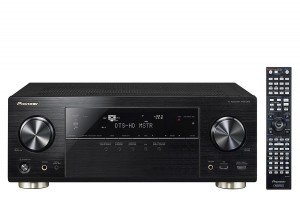
Рисунок 3.1: Передняя часть view of the Pioneer VSX-923K A/V Receiver alongside its remote control. The receiver features a black finish with a central display, input selectors, and volume knob. The remote control is slim and black with numerous buttons.
3.1 Основные характеристики
- 7.2 Channel A/V Receiver with dual sub-woofer preouts.
- 4K Ultra HD video upscaling and pass-through.
- High-Resolution Audio playback (WAV, FLAC, AIFF, Apple Lossless up to 192kHz/24-bit).
- Network streaming via DLNA or Apple AirPlay.
- Smartphone connectivity for iPod, iPhone, iPad, or Android.
- Built-in ECO Mode for energy saving.
- Multi-room audio with powered Zone 2 output.
4. Настройка
4.1 Распаковка и размещение
Carefully remove the receiver from its packaging. Ensure all accessories are present (remote control, batteries, setup microphone, FM antenna, AM loop antenna, power cord).
Place the receiver on a stable, level surface with adequate ventilation. Avoid placing it in direct sunlight or near heat sources. Allow at least 10 cm (4 inches) of clear space around the top and sides for proper airflow.
4.2 Подключение динамика
The VSX-923K supports a 7.2 channel speaker configuration. Connect your speakers to the corresponding terminals on the rear panel. Ensure correct polarity (+ to + and - to -) for all speakers.
- Фронтальные динамики (Л/П): Подключитесь к клеммам FRONT L/R.
- Центральный динамик: Подключитесь к терминалу CENTER.
- Динамики объемного звучания (Л/П): Подключитесь к клеммам SURROUND L/R.
- Тыловые/верхние колонки объемного звучания (левая/правая): Подключитесь к клеммам SURROUND BACK/HEEGH L/R.
- Сабвуферы: Connect to SUBWOOFER 1 and SUBWOOFER 2 pre-out jacks using RCA cables.
4.3 Подключение аудио/видеокомпонентов
Use appropriate cables (HDMI, optical, coaxial, RCA) to connect your source devices (Blu-ray player, game console, cable box, etc.) to the receiver's input jacks.
- HDMI: For high-definition audio and video. Connect HDMI OUT to your TV/projector and HDMI IN to your source devices. The VSX-923K has 8 HDMI inputs.
- Optical/Coaxial Digital: For digital audio from devices without HDMI.
- Аналоговый Аудио: For analog audio devices (e.g., CD player, turntable with pre-amp).
- USB: Для подключения USB-накопителей для воспроизведения музыки.
- LAN: Connect an Ethernet cable for network features (Internet Radio, DLNA, AirPlay).
4.4 Начальная настройка и калибровка MCACC
After connecting all components, power on the receiver. Pioneer's Multi-Channel Acoustic Calibration System (MCACC) will guide you through the initial speaker setup and room calibration process. Use the supplied setup microphone for accurate measurements.
- Connect the MCACC setup microphone to the front panel jack.
- Расположите микрофон в основной точке прослушивания.
- Follow the on-screen instructions on your TV to start the MCACC calibration.
- The system will emit test tones to measure speaker size, level, distance, and equalization.
5. Инструкция по эксплуатации
5.1 Основные операции
- Включение/выключение питания: Нажмите кнопку ПИТАНИЕ на передней панели или пульте дистанционного управления.
- Выбор входа: Use the INPUT SELECTOR buttons on the front panel or remote to choose your desired source (e.g., BD/DVD, GAME, TV/SAT).
- Регулятор громкости: Adjust the MASTER VOLUME knob on the front panel or VOL +/- buttons on the remote.
- Звуковые режимы: Press the SURROUND, STEREO, or ADVANCED SURROUND buttons on the remote to select different audio processing modes.
5.2 Сетевые функции
Connect the receiver to your home network via an Ethernet cable or an optional wireless LAN adapter to access the following features:
- Интернет-радио: Получите доступ к тысячам интернет-радиостанций по всему миру.
- DLNA: Потоковая музыка files from compatible devices on your home network (e.g., PC, NAS).
- Apple AirPlay: Stream music wirelessly from your Apple devices.
- Обновления прошивки: Keep your receiver's software up-to-date via network connection.
5.3 Управление со смартфона/планшета
Download the free Pioneer iControlAV2013 app for your iOS or Android device to control the receiver remotely. The app provides an intuitive interface for input selection, volume control, sound mode adjustments, and more.
5.4 ЭКО режим
Activate ECO Mode to reduce power consumption without significantly compromising sound and video performance. This feature can be enabled or disabled through the receiver's on-screen menu.
6. Техническое обслуживание
6.1 Очистка
To maintain the appearance of your receiver, wipe the cabinet and front panel with a soft, dry cloth. Do not use abrasive cleaners, waxes, or solvents as they may damage the finish.
Для стойких пятен слегка dampСмочите ткань водой с мягким моющим средством, затем немедленно вытрите насухо.
6.2 Вентиляция
Ensure that the ventilation openings on the top and sides of the receiver are not blocked. Proper ventilation is crucial to prevent overheating and ensure long-term reliability.
6.3 обновлений прошивки
Periodically check for firmware updates via the network connection. Updates can improve performance, add new features, and resolve potential issues. Refer to the on-screen menu for checking and performing updates.
7. Поиск Неисправностей
If you experience problems with your receiver, refer to the following common issues and solutions before contacting customer support.
| Проблема | Возможная причина | Решение |
|---|---|---|
| Нет электричества | Шнур питания подключен ненадежно. | Check power cord connection to the receiver and wall outlet. |
| Нет звука | Incorrect input selected; speakers not connected properly; volume too low; Mute is on. | Select correct input; check speaker wire connections; increase volume; press MUTE button on remote. |
| Нет видео | Incorrect input selected; HDMI cable not connected properly; TV input not set to receiver. | Select correct input; check HDMI cable connections; ensure TV is on the correct HDMI input. |
| Пульт дистанционного управления не работает | Batteries are dead or inserted incorrectly; obstacle between remote and receiver. | Replace batteries; ensure correct polarity; remove obstacles; point remote directly at receiver. |
| Сетевые функции не работают. | Network cable disconnected; router/modem issue; incorrect network settings. | Check LAN cable connection; restart router/modem; verify network settings in receiver menu. |
8. Технические характеристики
The following are key technical specifications for the Pioneer VSX-923K A/V Receiver:
| Особенность | Деталь |
|---|---|
| Модель | VSX-923-К |
| Каналы | 7.2 канала |
| Аудио Ватtage | 190 Watts (per channel, 6 ohms, 1 kHz, 1% THD, 1 ch driven) |
| Масштабирование видео | 4K Ультра HD |
| Входы HDMI | 8 |
| Выходы HDMI | 1 |
| Форматы аудио | MP3, WMA, AAC, FLAC, WAV, AIFF, Apple Lossless |
| Связность | USB, HDMI, Ethernet (LAN), Bluetooth (Built-In), FM Tuner |
| Особые возможности | Built-In Bluetooth, Subwoofer Pre-outs (x2), FM Tuner, Internet Radio, DLNA, AirPlay, ECO Mode, Zone 2 Audio Output |
| Размеры (приблизительные) | 43.5 х 36.25 х 16.8 см (Ш х Г х В) |
| Вес (приблизительный) | 11.5 кг |
9. Гарантия и поддержка
Информацию о гарантии см. в гарантийном талоне, прилагаемом к вашему продукту, или посетите официальный сайт Pioneer. webСохраните чек о покупке для предъявления гарантийных претензий.
For technical support, service, or inquiries, please contact Pioneer customer service. Contact details can typically be found on the Pioneer webсайте или в упаковке продукта.
Пионерский чиновник Webсайт: www.pioneer-india.in
Ask a question about this manual
Ask about setup, troubleshooting, compatibility, parts, safety, or missing instructions. Manuals+ will review the question and use this page’s manual context to help answer it.