
John Deere AM103119
Инструкция по эксплуатации оригинального переключателя John Deere #AM103119
Genuine John Deere Part for Agricultural and Lawn Equipment
Продукт болееview
The John Deere Original Equipment Safety Switch, part number AM103119, is a crucial component designed to ensure the safe operation of various John Deere equipment. This genuine part functions as a safety interlock, preventing equipment from operating under unsafe conditions, such as when an operator is not present or a guard is open.
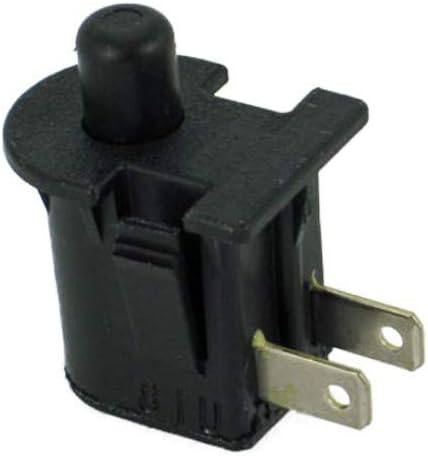
Image: John Deere Original Equipment Safety Switch AM103119. This image shows the black plastic switch with a protruding black button on top and two flat metal terminals extending from the bottom.
Совместимость
This safety switch is compatible with a wide range of John Deere equipment models, including:
Compact Tractor Models:
- 2025П, 2027П, 2032П
- 2210, 2305, 2320, 2720
- 3320, 3720
- 4110, 4115, 4200, 4210, 4300, 4310, 4320, 4410, 4500, 4510, 4520, 4600, 4610, 4700, 4710, 4720
- 485А
- 5205
Riding Mower Models:
- 92Н, 107Н
- 1600
- 240, 245, 260, 285
- 320, 325, 335, 345
- 415, 425, 445, 455
- F510, F52555, FGT242
- GT262, GT275
- LX172, LX173, LX176, LX178, LX186, LX188
- STX30, STX38
Walk Behind Mower Models:
- HD45, HD75
- WH36A, WH48A, WH52A, WH61A
- X115R, X116R, X130R, X135R, X146R, X155R, X350R
Ztrak Models:
- 717A, 717E, 727, 727A
- Z510A, Z520A
- Z710A, Z720A
- Z810A, Z840A, Z850A, Z860A
- Z915B, Z915E, Z920M, Z920R, Z925A, Z925M, Z930A, Z930M, Z930R, Z950A, Z950M, Z950R, Z955M, Z960A, Z960M, Z960R, Z970A, Z970R, Z997R
Настройка и установка
Важное примечание о безопасности: Always disconnect the battery or power source before performing any maintenance or installation on your equipment. Refer to your equipment's specific service manual for detailed instructions and safety precautions.
- Определить местоположение: Locate the existing safety switch on your John Deere equipment. Common locations include under the seat, near the PTO lever, or within the transmission system.
- Отсоедините проводку: Carefully disconnect the electrical connectors from the old switch. Note the orientation and connection points if not clearly marked.
- Удалить старый переключатель: Unfasten any mounting hardware (screws, clips, or retaining rings) securing the old switch and remove it from its position.
- Установите новый коммутатор: Insert the new John Deere Original Equipment Switch #AM103119 into the designated mounting location. Ensure it is properly seated and secured with the appropriate hardware.
- Переподключите проводку: Reconnect the electrical connectors to the new switch. Verify that all connections are secure and correctly oriented.
- Тестовая функциональность: Reconnect the battery or power source. Test the safety switch's operation according to your equipment's manual to ensure it properly engages and disengages the safety interlock system.
If you are unsure about any step, it is recommended to consult a qualified service technician or your equipment's official service manual.
Принципы работы
The AM103119 safety switch is a normally closed or normally open switch that changes its state based on a physical input (e.g., seat occupied, PTO disengaged, brake applied). When the required safety condition is met, the switch allows the electrical circuit to complete, enabling the equipment to start or operate. If the safety condition is not met, the switch interrupts the circuit, preventing operation and enhancing user safety.
Напримерample, if used as a seat safety switch, it ensures the engine only runs when an operator is seated. If used as a PTO safety switch, it ensures the power take-off is disengaged before starting the engine or leaving the operator's station.
Обслуживание
Regular inspection of the safety switch can help ensure its continued reliability:
- Визуальный осмотр: Periodically check the switch for any visible signs of damage, corrosion, or wear. Ensure the button or lever mechanism moves freely without sticking.
- Проверка связи: Verify that the electrical connections to the switch are clean, tight, and free from corrosion. Loose or corroded connections can lead to intermittent operation.
- Тест функциональности: Regularly test the safety switch as part of your equipment's pre-operation checks. Ensure it correctly prevents operation when safety conditions are not met.
- Уборка: Keep the area around the switch clean and free of debris, dirt, and moisture, which can interfere with its operation.
Do not attempt to bypass or modify the safety switch, as this can compromise the safety features of your equipment and lead to serious injury.
Поиск неисправностей
If your equipment is not starting or operating as expected, and you suspect the safety switch may be the cause, consider the following:
| Симптом | Возможная причина | Решение |
|---|---|---|
| Engine will not crank or start. | Safety switch not engaged (e.g., operator not in seat, PTO engaged, brake not set). | Ensure all safety conditions are met (e.g., sit firmly on seat, disengage PTO, apply brake). |
| Двигатель проворачивается, но не заводится. | Faulty safety switch or wiring issue. | Check electrical connections for looseness or corrosion. Test switch continuity with a multimeter (if experienced). |
| Intermittent starting issues. | Loose connections, worn switch, or debris. | Inspect wiring and switch for physical damage or obstruction. Clean the switch area. |
| Equipment unexpectedly shuts off. | Safety switch disengaged due to operator movement or faulty switch. | Verify operator position. If issue persists, inspect or replace the switch. |
If troubleshooting steps do not resolve the issue, it is recommended to consult a certified John Deere technician.
Технические характеристики
- Номер детали: АМ103119
- Производитель: Джон Дир
- Тип: Original Equipment Safety Switch
- ASIN: B00DNHCVAO
This switch is designed to meet John Deere's rigorous quality and performance standards for original equipment parts.
Гарантия и поддержка
For information regarding the warranty of your John Deere Original Equipment Switch #AM103119, please refer to the official John Deere warranty documentation provided with your equipment or contact an authorized John Deere dealer. Specific warranty terms may vary based on region and purchase date.
For technical support or further assistance, please contact your local authorized John Deere service center or visit the official John Deere webсайт.
Ask a question about this manual
Ask about setup, troubleshooting, compatibility, parts, safety, or missing instructions. Manuals+ will review the question and use this page’s manual context to help answer it.