
Schneider Electric SR3B261FU
Schneider Electric Zelio SR3B261FU Logic Controller User Manual
Модель: SR3B261FU
1. Введение
This user manual provides essential information for the safe and efficient installation, operation, and maintenance of the Schneider Electric Zelio SR3B261FU Logic Controller. Please read this manual thoroughly before attempting to install or operate the device. Keep this manual for future reference.
2. Информация по технике безопасности
ПРЕДУПРЕЖДЕНИЕ: Risk of electric shock. This device operates with high voltage. Installation, maintenance, and troubleshooting should only be performed by qualified personnel.
- Always disconnect power before installing, wiring, or servicing the device.
- Обеспечьте правильное заземление во избежание поражения электрическим током.
- Не используйте устройство, если оно повреждено или если отсутствуют какие-либо компоненты.
- Соблюдайте все местные и национальные электротехнические нормы и правила.
- При работе с электрооборудованием используйте соответствующие средства индивидуальной защиты (СИЗ).
3. Продукт закончилсяview
The Schneider Electric Zelio SR3B261FU is a compact, programmable logic controller (PLC) designed for simple automation systems. It features 26 input/output (I/O) points and operates on a 100-240 VAC power supply, making it suitable for a wide range of industrial and commercial applications. Its compact design allows for easy integration into control panels.
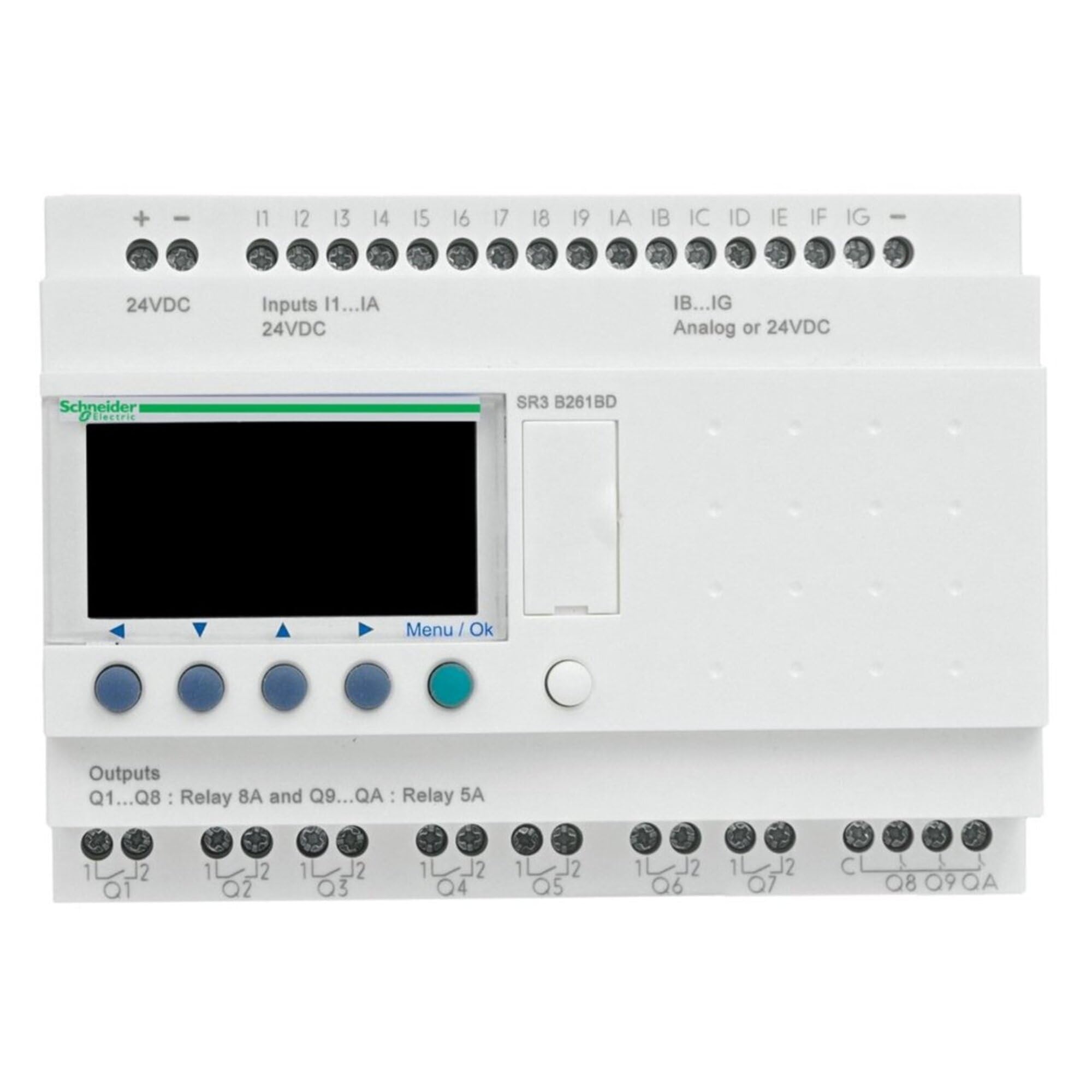
Рисунок 1: Передний view of the Schneider Electric Zelio SR3B261FU Logic Controller. This image shows the compact design, input/output terminals, and display interface of the device.
4. Настройка и установка
4.1 Монтаж
The Zelio SR3B261FU is designed for DIN rail mounting. Ensure the mounting surface is stable and free from excessive vibration. Allow adequate space around the device for ventilation and wiring access.
- Attach the device to a standard 35mm DIN rail by hooking the top edge onto the rail and pressing down until it clicks into place.
- Verify that the device is securely fastened to the DIN rail.
4.2. Электропроводка
Refer to the wiring diagram provided with the product for specific connection details. Ensure all connections are secure and correctly polarized.
- Источник питания: Connect the 100-240 VAC power supply to the designated terminals. Observe correct line and neutral connections.
- Входные данные: Connect sensors, switches, and other input devices to the input terminals.
- Выходы: Connect actuators, relays, and other output devices to the output terminals. Ensure the load current does not exceed the specified limits for each output.
- Заземление: Подключите клемму защитного заземления (PE) к надежной точке заземления.
5. Инструкция по эксплуатации
5.1. Включение
After completing all wiring, apply power to the Zelio SR3B261FU. The device will perform a self-test, and the display (if present) will show the current status or program information.
5.2. Программирование
The Zelio SR3B261FU is programmed using Schneider Electric's Zelio Soft software. Connect the logic controller to a computer via the appropriate programming cable (sold separately). Refer to the Zelio Soft software manual for detailed programming instructions.
- Create your control logic using ladder diagram (LD) or function block diagram (FBD).
- Transfer the program to the Zelio SR3B261FU.
- Monitor the program execution and I/O status through the software or the device's display.
5.3. Manual Control (if applicable)
Some Zelio models may feature buttons for manual control or parameter adjustment directly on the device. Consult the specific product documentation for your model to understand these functions.
6. Техническое обслуживание
The Zelio SR3B261FU is designed for minimal maintenance. Regular inspection and cleaning are recommended to ensure optimal performance and longevity.
- Уборка: Disconnect power before cleaning. Use a soft, dry cloth to wipe the exterior of the device. Do not use abrasive cleaners or solvents.
- Инспекция: Periodically check all wiring connections for tightness and signs of corrosion. Inspect the device for any physical damage or discoloration.
- Вентиляция: Во избежание перегрева убедитесь, что вентиляционные отверстия не заблокированы.
7. Поиск Неисправностей
This section provides solutions to common issues. For more complex problems, contact Schneider Electric technical support.
| Проблема | Возможная причина | Решение |
|---|---|---|
| Устройство не включается. | Отсутствует электропитание; неправильная проводка; перегоревший предохранитель. | Проверьте силовые соединения; проверьте напряжение.tage; inspect fuses. |
| Вводимые данные не отвечают. | Incorrect input wiring; faulty sensor; program error. | Проверьте входную проводку; протестируйте работоспособность датчиков; проверьте логику программы. |
| Выходы не активируются. | Incorrect output wiring; overloaded output; program error. | Verify output wiring; check load current; review логика программы. |
| Communication error with software. | Incorrect cable; driver issue; software settings. | Ensure correct programming cable; install drivers; check software communication settings. |
8. Технические характеристики
| Особенность | Деталь |
|---|---|
| Производитель | ШНАЙДЕР ЭЛЕКТРИК |
| Номер детали | SR3B261FU |
| Вес товара | 13.6 унции |
| Размеры продукта | 3.9 x 5.3 x 2.7 дюйма |
| Номер модели товара | SR3B261FU |
| Цвет | Многоцветный |
| Стиль | Компактный |
| Заканчивать | Полированный |
| Материал | Медь |
| Количество в упаковке | 1 |
| Включенные компоненты | SR3B261FU |
| Нужны ли батареи? | Нет |
| ASIN | B00CONKRTK |
| Дата первой доступности | 7 мая 2013 г. |
9. Гарантия и поддержка
9.1. Информация о гарантии
According to the product specifications, this device is provided with Нет гарантии. Please refer to your purchase agreement or contact your distributor for any specific warranty terms that may apply.
9.2. Техническая поддержка
For technical assistance, product inquiries, or to report issues, please contact Schneider Electric customer support. You can find contact information on the official Schneider Electric webсайт:
Schneider Electric Customer Care
When contacting support, please have your product model number (SR3B261FU) and any relevant purchase details ready.
Ask a question about this manual
Ask about setup, troubleshooting, compatibility, parts, safety, or missing instructions. Manuals+ will review the question and use this page’s manual context to help answer it.