
Введение
Thank you for choosing the Beetel M53 CLI Corded Phone. This manual provides detailed instructions for setting up, operating, and maintaining your new telephone. Please read this manual carefully before use to ensure proper functionality and to maximize your experience with the product.
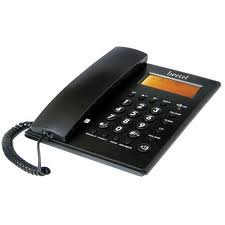
Figure 1: Beetel M53 CLI Corded Phone. This image displays the main unit of the Beetel M53 corded phone, showcasing its compact design and keypad.
Настраивать
Follow these steps to set up your Beetel M53 CLI Corded Phone:
- Подключите трубку: Plug one end of the coiled cord into the handset and the other end into the jack labeled ТРУБКА сбоку от телефонной базы.
- Подключите сетевой кабель: Вставьте один конец телефонного кабеля в разъем с маркировкой. ЛИНИЯ на задней панели телефонной базы. Вставьте другой конец в настенную телефонную розетку.
- Подключение питания: The phone is powered via the telephone line. No external power adapter is required for basic operation.
- Начальный дисплей: Upon successful connection, the 12-digit green/orange backlit LCD will display the current time and date.

Figure 2: Connection Diagram. This diagram illustrates how to connect the handset and the telephone line cord to the Beetel M53 phone base.
Инструкция по эксплуатации
Совершение и прием звонков
- Сделать звонок: Поднимите трубку или нажмите СПИКЕР button. Dial the desired telephone number.
- Чтобы принять вызов: Когда телефон зазвонит, поднимите трубку или нажмите кнопку СПИКЕР кнопка.
- Чтобы завершить вызов: Поместите трубку обратно на подставку или нажмите кнопку. СПИКЕР Нажмите кнопку еще раз, если используется громкая связь.
Caller ID (CLI) Features
The Beetel M53 supports FSK/DTMF compatible caller ID and Centrex enabled CLIP (Calling Line Identification Presentation).
- Incoming Call Display: The 12-digit LCD will display the incoming number, new call indicator, total calls, and repeat calls.
- Incoming Memory: The phone stores up to 80 incoming call records.
- Outgoing Memory: Телефон может хранить до 24 записей исходящих звонков.
- Checking Calls: Используйте ВВЕРХ/ВНИЗ navigation buttons to scroll through incoming and outgoing call records.
- Erasing Calls: Пока viewЧтобы просмотреть запись звонка, нажмите кнопку УДАЛИТЬ кнопку, чтобы стереть его.
- Перезвони: Пока viewing an incoming call record, press the ПЕРЕЗВОНИТЕ button to dial the number.
LCD Display and Clock
- The 12-digit green/orange backlit LCD provides clear visibility of numbers, time, and date.
- The real-time clock displays the year, date, and month.
- To set the time and date, refer to the specific instructions in the full manual (if available, otherwise this feature is typically automatic or set via network).
Speakerphone Facility
To use the speakerphone, press the СПИКЕР button during a call or before dialing. Press it again to end the call or switch back to the handset.
Базовый калькулятор
The phone includes a basic calculator function. To access it, press the КАЛЬК button (if present, or refer to specific key mapping). Use the numeric keypad for input and the designated function keys for operations.

Figure 3: LCD Display. This image shows the 12-digit LCD of the Beetel M53, illustrating how caller ID information and the real-time clock are displayed.
Обслуживание
- Уборка: Протрите телефон мягкой тряпкой.amp Ткань. Не используйте абразивные чистящие средства или растворители.
- Избегайте жидкостей: Держите телефон подальше от воды и других жидкостей.
- Температура: Не подвергайте телефон воздействию экстремальных температур или прямых солнечных лучей.
- Хранилище: If storing the phone for an extended period, disconnect it from the telephone line.
Поиск неисправностей
| Проблема | Возможное решение |
|---|---|
| Нет гудка | Check if the telephone line cord is securely connected to both the phone and the wall jack. Test with another phone if available. |
| Идентификатор вызывающего абонента не отображается | Ensure you have subscribed to Caller ID service from your telephone service provider. Verify the phone is connected correctly. |
| Дисплей пустой или тусклый | Check line connection. The display is line-powered. If the issue persists, contact customer support. |
| Не слышу звонящего / Звонящий меня не слышит | Adjust volume. Check handset cord connection. If using speakerphone, ensure microphone is not obstructed. |
Технические характеристики
| Особенность | Описание |
|---|---|
| Бренд | Бител |
| Модель | М53 |
| Тип телефона | рубчатый |
| Материал | Пластик |
| Источник питания | Проводной электрический (питание от сети) |
| Тип автоответчика | Цифровой |
| Идентификатор вызывающего абонента | Yes (FSK/DTMF compatible, Centrex enabled CLIP) |
| Память входящих вызовов | 80 записей |
| Память исходящих вызовов | 24 записей |
| ЖК-дисплей | 12-digit, Green/Orange Backlit |
| Часы | Real time clock with year, date, and month display |
| Дополнительные возможности | Speakerphone, Basic Calculator |
Гарантия и поддержка
Your Beetel M53 CLI Corded Phone comes with a standard manufacturer's warranty. Please retain your purchase receipt for warranty claims. For technical support, service, or warranty inquiries, please contact Beetel customer service through their official webсайт или контактную информацию, указанную в документации о покупке.
Для получения дополнительной помощи посетите, пожалуйста, Beetel Store on Amazon.