
D-Link DIR-636L
D-Link Wireless N 300 Mbps Home Cloud App-Enabled Gigabit Router (DIR-636L) User Manual
Модель: ДИР-636Л
Введение
This manual provides comprehensive instructions for setting up, operating, and maintaining your D-Link Wireless N 300 Mbps Home Cloud App-Enabled Gigabit Router (DIR-636L). Please read this manual thoroughly before using the device to ensure optimal performance and safety.
Что в коробке?
- D-Link Cloud Router 1200 (DIR-636L)
- Ethernet-кабель
- Адаптер питания
- Краткое руководство по установке
Продукт болееview


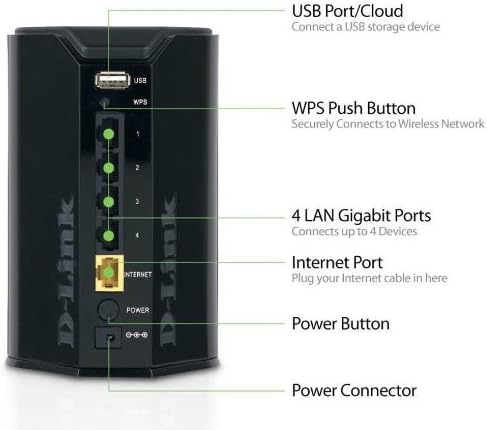
The D-Link DIR-636L Cloud Router is designed for high-performance wireless connectivity and network management. It features a compact, vertical design with indicator lights on the front and all connectivity ports on the rear for efficient cable management.
Настраивать
Первоначальная установка
- Распакуйте маршрутизатор: Аккуратно извлеките все компоненты из коробки.
- Расположите маршрутизатор: Place the router in a central location in your home for optimal wireless coverage. Avoid placing it near large metal objects or other electronic devices that may cause interference.
- Подключите модем: Connect one end of the provided Ethernet cable to the Internet port (yellow) on the back of the DIR-636L router and the other end to your modem's Ethernet port.
- Подключите питание: Plug the power adapter into the router's power connector and then into a wall outlet. The power LED on the front of the router should illuminate.
- Включение питания: Press the power button on the back of the router. Wait for the Internet LED to turn solid green, indicating a successful connection.
Конфигурация через Web Браузер
- Подключитесь к маршрутизатору: Connect your computer to one of the LAN Gigabit ports (1-4) on the router using an Ethernet cable, or connect wirelessly to the default Wi-Fi network (SSID and password are on a label on the router).
- Мастер настройки доступа: Откройте web браузер и тип http://dlinkrouter.local or http://192.168.0.1 в адресную строку.
- Следуйте инструкциям на экране: The D-Link Setup Wizard will guide you through configuring your Internet connection, wireless network name (SSID), and password.
Configuration via QRS Mobile App
For quick setup using your smartphone or tablet, download the free D-Link QRS Mobile app from your device's app store. The app will guide you through the setup process step-by-step.
Эксплуатация маршрутизатора
Беспроводное подключение
The DIR-636L provides wireless speeds up to 300 Mbps, ideal for video streaming and web surfing. Its built-in high-powered amplifier ensures wall-to-wall coverage throughout your home.
Беспроводное подключение устройств:
- Стандартное подключение: On your device, select your Wi-Fi network name (SSID) and enter the password you configured during setup.
- WPS (защищенная настройка Wi-Fi): Press the WPS button on the back of the router (labeled "WPS") and then activate WPS on your wireless device within two minutes to establish a secure connection without entering a password.
Проводное подключение
The router features four Gigabit Ethernet ports for blazing fast wired connections. These are ideal for gaming consoles, smart TVs, desktop computers, and other devices requiring stable, high-speed connections.
SharePort Mobile App
Utilize the free D-Link SharePort Mobile app to wirelessly access media files (videos, music, photos) stored on a USB drive connected to the router's USB 2.0 port. This allows you to stream content directly to your iPhone, iPad, or Android device.
Official D-Link video demonstrating the features of the Wireless-N300 Dual-Band Gigabit Cloud Router, including wireless file sharing and network monitoring capabilities.
mydlink Cloud Services
The mydlink app allows you to monitor and manage your home network remotely from your iPhone, iPad, or Android device. You can view web browsing history, see connected and blocked devices in real-time, and receive automatic email alerts for unauthorized connections.
Обслуживание
- Регулярные перезагрузки: Periodically rebooting your router (unplugging and replugging the power) can help clear its memory and improve performance. A monthly reboot is generally sufficient.
- Обновления прошивки: Проверьте поддержку D-Link. webСайт для обновления прошивки. Поддержание прошивки вашего маршрутизатора в актуальном состоянии обеспечивает оптимальную производительность, безопасность и доступ к новым функциям.
- Физическая очистка: Keep the router clean and free of dust to prevent overheating. Use a soft, dry cloth.
- Безопасность: Regularly change your Wi-Fi password and router login credentials. Use strong, unique passwords.
Поиск неисправностей
Нет подключения к Интернету
- Проверьте кабели: Ensure all Ethernet cables are securely connected to the correct ports on the router and modem.
- Перезагрузить устройства: Power cycle your modem first, wait 30 seconds, then power cycle your router. Wait for all indicator lights to stabilize.
- Проблема с интернет-провайдером: Обратитесь к своему интернет-провайдеру (ISP), чтобы убедиться в отсутствии перебоев в обслуживании.tagв вашем районе.
Slow Wireless Speed or Poor Coverage
- Размещение маршрутизатора: Move the router to a more central location, away from obstructions like thick walls, large metal objects, or other electronics.
- Вмешательство: Other wireless devices (cordless phones, microwaves) can cause interference. Try changing your Wi-Fi channel in the router settings.
- Слишком много устройств: If many devices are connected, consider upgrading to a higher-speed router or optimizing network usage.
Cannot Access Router Setup Page
- IP-адрес: Убедитесь, что ваш компьютер настроен на автоматическое получение IP-адреса (DHCP).
- Правильный адрес: Double-check that you are typing the correct address (http://dlinkrouter.local or http://192.168.0.1).
- Брандмауэр/Антивирус: Временно отключите на вашем компьютере все брандмауэры и антивирусные программы, которые могут блокировать доступ.
- Сброс к заводским настройкам: As a last resort, perform a factory reset by pressing and holding the reset button on the router for 10 seconds. Примечание: это приведет к удалению всех ваших пользовательских настроек.
Технические характеристики
| Особенность | Деталь |
|---|---|
| Название модели | ДИР-636Л |
| Тип беспроводной связи | 802.11bgn |
| Скорость беспроводной связи | До 300 Мбит/с |
| Ethernet-порты | 4 гигабитный Ethernet |
| USB-порты | 1 порта USB 2.0 |
| Безопасность | Wi-Fi Protected Access (WPA/WPA2), WPS |
| IPv6 Certified | Да |
| Размеры (ДxШxВ) | 4.5 x 3.8 x 5.5 дюйма |
| Вес товара | 9.9 унции |
| Совместимые операционные системы | Windows 7, Windows Vista, Windows XP SP2, Mac OS X (v10.4) |
Гарантия и поддержка
The D-Link Wireless N 300 Mbps Home Cloud App-Enabled Gigabit Router (DIR-636L) comes with a Ограниченная гарантия сроком на 1 год. D-Link also provides 24/7 basic installation support.
For further assistance, technical support, or to check for the latest firmware updates, please visit the official D-Link support webсайт или свяжитесь с их службой поддержки.
Note: Warranty terms may vary by region. Please refer to the warranty card included with your product or the D-Link webсайт для конкретных деталей.
Связанные документы - ДИР-636Л
 |
Руководство пользователя D-Link DIR-880L: беспроводной двухдиапазонный гигабитный облачный маршрутизатор AC1900. Данное руководство пользователя содержит подробные инструкции по настройке, конфигурированию и использованию беспроводного двухдиапазонного гигабитного облачного маршрутизатора D-Link DIR-880L AC1900, охватывающие такие функции, как высокоскоростной Wi-Fi, гигабитный Ethernet, облачные сервисы mydlink и технология SharePort. |
 |
Руководство пользователя беспроводного двухдиапазонного гигабитного облачного маршрутизатора D-Link DIR-868L AC1750 Полное руководство пользователя для беспроводного двухдиапазонного гигабитного облачного маршрутизатора D-Link DIR-868L AC1750, охватывающее установку, настройку, функции, устранение неполадок и технические характеристики. |
 |
Краткое руководство по установке двухдиапазонного гигабитного маршрутизатора D-Link DIR-836L N750. Краткое руководство по началу работы с беспроводным двухдиапазонным гигабитным маршрутизатором D-Link DIR-836L N750. Включает инструкции по настройке, содержимое упаковки, пояснения к светодиодным индикаторам и контактную информацию службы технической поддержки. |
 |
Краткое руководство по установке беспроводного двухдиапазонного гигабитного облачного маршрутизатора D-Link DIR-866L AC1750 AC1750. Подробное руководство по установке и настройке беспроводного двухдиапазонного гигабитного облачного маршрутизатора D-Link DIR-866L AC1750, включающее информацию о комплекте поставки и оборудовании.viewэтапы подключения, web Настройка браузера, настройка QRS Mobile и устранение неполадок. |
 |
Руководство пользователя беспроводного облачного маршрутизатора D-Link DIR-605L Wireless N 300 Данное руководство пользователя содержит подробные инструкции и технические характеристики беспроводного облачного маршрутизатора D-Link DIR-605L Wireless N 300, охватывающие установку, настройку, безопасность беспроводной сети и устранение неполадок. |
 |
Краткое руководство по установке беспроводного двухдиапазонного гигабитного облачного маршрутизатора D-Link DIR-868L AC1750 AC1750. This guide provides instructions for setting up and configuring the D-Link DIR-868L Wireless AC1750 Dual Band Gigabit Cloud Router, including hardware overview, package contents, connection steps, web and mobile configuration, and troubleshooting. |
Ask a question about this manual
Ask about setup, troubleshooting, compatibility, parts, safety, or missing instructions. Manuals+ will review the question and use this page’s manual context to help answer it.