
1. Введение
The Gembird Bi-Directional SATA/IDE Converter (Model SATA-IDE-2) is designed to bridge the gap between older IDE technology and modern SATA interfaces. This versatile converter allows you to connect older IDE devices, such as hard drives or optical drives, to a SATA host controller, or conversely, connect newer SATA devices to an older IDE host controller. It provides a cost-effective solution for extending the life of your existing hardware or integrating different generations of storage devices.
2. Информация по технике безопасности
- Always ensure your computer system is powered off and unplugged before installing or removing any hardware components.
- Handle the converter and connected devices with care to avoid static discharge, which can damage electronic components.
- Не подвергайте устройство воздействию влаги, экстремальных температур или прямых солнечных лучей.
- Держите устройство в недоступном для детей месте.
- Use only compatible power and data cables.
3. Содержимое упаковки
Пожалуйста, убедитесь, что в вашей посылке содержатся следующие предметы:
- Gembird Bi-Directional SATA/IDE Converter (SATA-IDE-2)
- Кабель для передачи данных SATA
- 4-pin Molex Power Cable
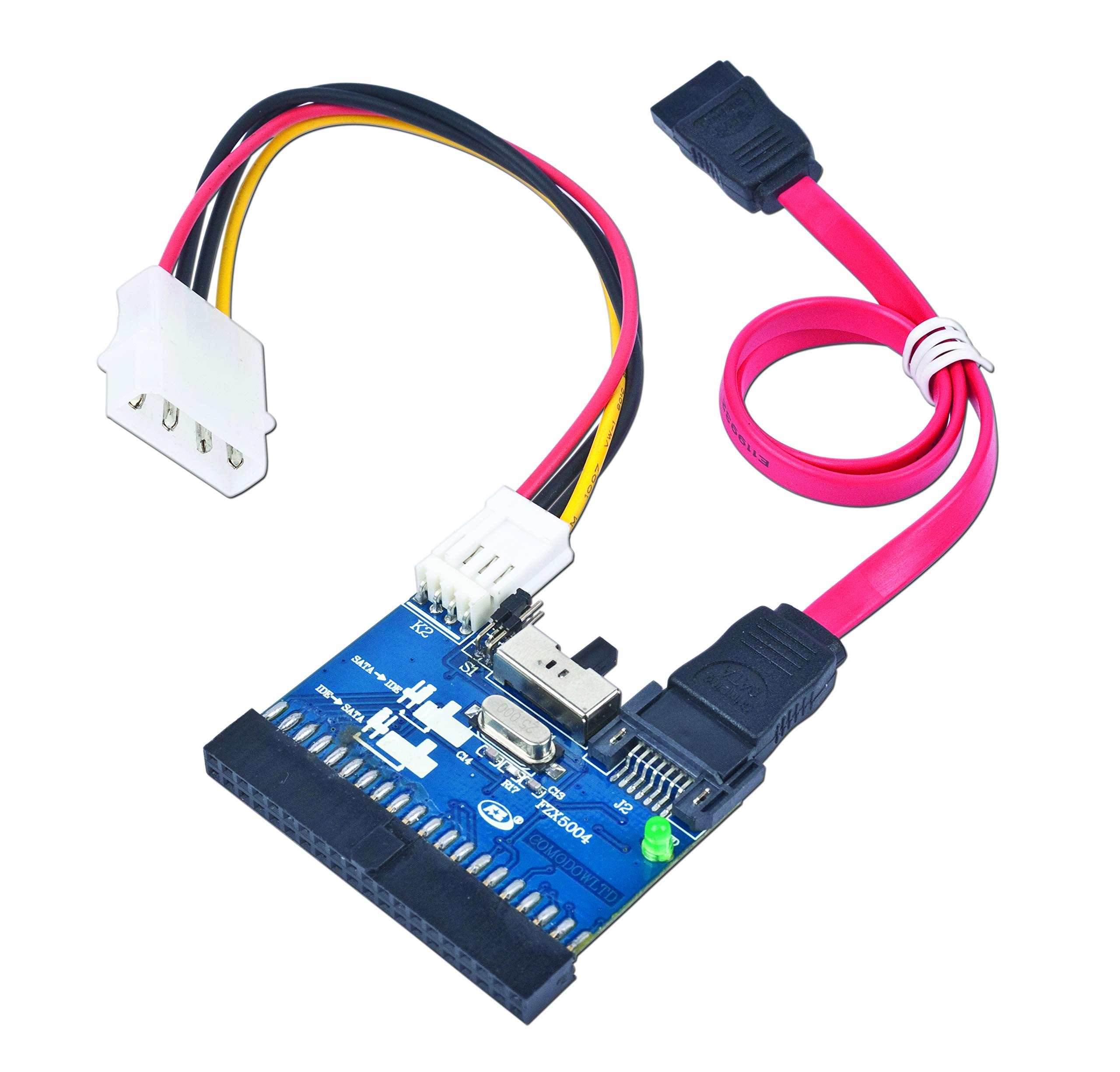
This image displays the Gembird Bi-Directional SATA/IDE Converter, its packaging, a red SATA data cable, and a 4-pin Molex power cable. The converter board is blue with various connectors.
4. Настройка и установка
The Gembird SATA/IDE converter supports bi-directional operation. Follow the appropriate steps below based on your connection needs.
4.1. Connecting an IDE Device to a SATA Host Controller
- Убедитесь, что ваш компьютер выключен и отключен от сети.
- Connect the 40-pin IDE connector on the converter to the IDE port on your IDE hard drive or ATAPI device.
- Connect one end of the SATA data cable to the 7-pin SATA connector on the converter.
- Connect the other end of the SATA data cable to an available SATA port on your motherboard or SATA host controller.
- Connect the 4-pin Molex power cable from your power supply to the power input on the converter. Ensure the IDE device also receives power from your power supply.
- Power on your computer. The IDE device should now be detected by your SATA host controller.
4.2. Connecting a SATA Device to an IDE Host Controller
- Убедитесь, что ваш компьютер выключен и отключен от сети.
- Connect the 7-pin SATA connector on the converter to the SATA port on your SATA hard drive or optical drive.
- Connect one end of the 40-pin IDE connector on the converter to an available IDE port on your motherboard or IDE host controller.
- Connect the 4-pin Molex power cable from your power supply to the power input on the converter. Ensure the SATA device also receives power from your power supply.
- Power on your computer. The SATA device should now be detected by your IDE host controller.
5. Инструкция по эксплуатации
The Gembird SATA/IDE converter is designed for ease of use with plug-and-play functionality. No specific drivers are required for operation under most common operating systems, including Windows 8, 7, Vista, XP, 2000, Me, NT, 98SE, 95, 3.1, and DOS 5.0.
Once connected, the converter allows for data transfer between the connected device and the host system. It supports Serial ATA 1.0 interface with data transfer rates up to 150 MBytes/sec and is compatible with UDMA-33/66/100/133/150 IDE hard drives and most ATAPI devices.
Важное примечание: This converter, based on the JM20330 chipset, is intended for connecting secondary storage devices. It does not support booting from a connected drive. Do not attempt to install an operating system on a drive connected via this adapter if you intend to boot from it.
6. Техническое обслуживание
The Gembird SATA/IDE converter requires minimal maintenance. Keep the device clean and free from dust. Use a soft, dry cloth for cleaning. Avoid using liquid cleaners or solvents. Ensure all connections are secure to prevent data transfer issues.
7. Поиск Неисправностей
- Устройство не обнаружено:
- Убедитесь, что все силовые и информационные кабели надежно подключены.
- Verify that the connected hard drive or optical drive is receiving power.
- Check the BIOS/UEFI settings of your computer to ensure the SATA/IDE ports are enabled.
- If connecting an IDE drive, ensure its jumper settings (Master/Slave/Cable Select) are configured correctly for your setup.
- По возможности протестируйте с разными кабелями.
- Медленная передача данных:
- Убедитесь, что кабели не повреждены.
- Убедитесь, что подключенное устройство работает корректно.
- The converter supports Serial ATA 1.0, which has a maximum transfer rate of 150 MBytes/sec. Performance will be limited by the slower of the two interfaces (SATA 1.0 or the IDE device's maximum speed).
- Cannot boot from connected drive:
- This converter, utilizing the JM20330 chipset, does not support booting an operating system from a connected drive. It is designed for data storage and transfer only. If you require a bootable solution, a different adapter with a boot-compatible chipset (e.g., Marvell 88SA8052) is necessary.
8. Технические характеристики
| Номер модели | SATA-IDE-2 |
| Чипсет | JM20330 |
| Интерфейс | Serial ATA 1.0, IDE (UDMA-33/66/100/133/150) |
| Скорость передачи данных | Up to 150 MBytes/sec (SATA 1.0) |
| Соединители | Standard female IDE 40-pin, Standard 7-pin Serial ATA |
| Размеры | 52 x 48 mm (Converter board) |
| Вес нетто | 12 г |
| Совместимость с операционными системами | Windows 8/7/Vista/XP/2000/Me/NT/98SE/95/3.1, DOS 5.0 |
| Функции | Встроенная возможность горячей замены и Plug & Play (не загрузочное устройство) |
9. Информация о гарантии
Gembird products are manufactured to the highest quality standards. This product is covered by a limited warranty against defects in materials and workmanship. For specific warranty terms and conditions, please refer to the official Gembird webна сайте или обратитесь к местному продавцу.
10 Поддержка
For technical support, frequently asked questions, and additional product information, please visit the official Gembird webсайт: