
Введение
This manual provides comprehensive instructions for the setup, operation, maintenance, and troubleshooting of your DISH DISH211 4-Device Universal Remote. Designed for ease of use, this remote supports DISH TV receivers and can control up to four different devices, including TVs and other entertainment systems. Its ability to learn commands from original remotes makes it a versatile replacement.
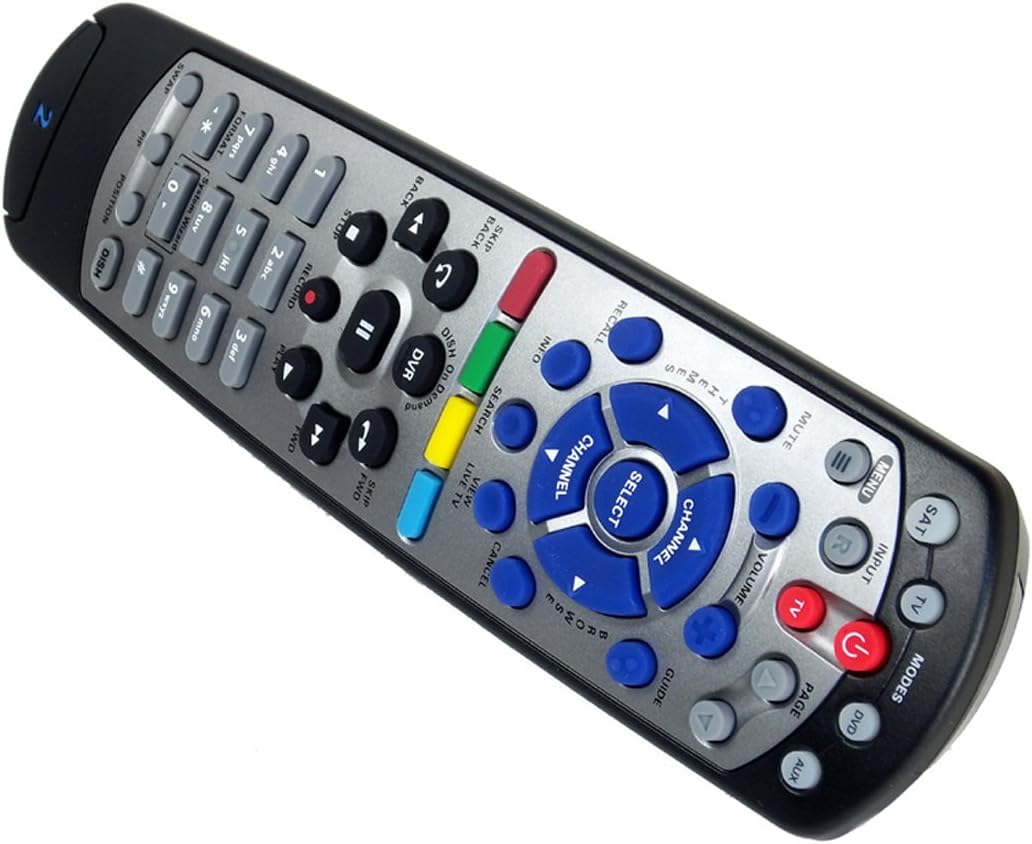
Figure 1: The DISH DISH211 4-Device Universal Remote, showcasinг его эргономичный дизайн и расположение кнопок.
Настраивать
1. Установка аккумулятора
The DISH211 remote requires two (2) AA batteries for operation. To install:
- Найдите батарейный отсек на задней стороне пульта дистанционного управления.
- Сдвиньте крышку батарейного отсека вниз и поднимите, чтобы открыть.
- Вставьте две батарейки типа АА, убедившись, что положительный (+) и отрицательный (-) полюса совпадают с индикаторами внутри отсека.
- Установите крышку батарейного отсека на место, сдвинув ее вверх до щелчка.
2. Device Pairing and Programming
The DISH211 remote can be programmed to control your DISH receiver and other devices. It supports both Infrared (IR) and Ultra High Frequency (UHF) communication, depending on your receiver model.

Figure 2: Cover of the official DISH Remote User Guide, which provides detailed programming instructions.
For DISH Receiver Pairing (UHF/IR):
Some DISH receivers may require setting the remote's address and communication type (UHF or IR). A small switch near the battery compartment may allow selection between UHF and IR modes. Ensure this switch is set correctly for your receiver type.
To address the remote to your receiver:
- Нажмите Системная информация button on the front of your receiver to access the system information screen.
- Нажмите и удерживайте СБ button on the remote until all mode lights illuminate.
- Enter a number between 1-15 on the remote keypad. This number corresponds to the TV-2 UHF address displayed on your receiver's screen.
- Нажмите # (pound) button once.
- Нажмите Записывать кнопку три раза.
- Выбирать Сделанный on the system info screen and test the remote's functionality.
For Other Devices (TV, DVD, AUX):
The remote has a large code library and can learn commands from your original remotes. Refer to the official DISH remote user guide (often included with the product or available online) for specific programming codes and learning instructions for various brands and device types.

Figure 3: The back of the DISH remote packaging, indicating compatible DISH receiver models for both IR and IR/UHF configurations.
Инструкция по эксплуатации
The DISH211 remote is designed for intuitive control of your entertainment system. It features backlit active MODE keys for visibility in low light conditions and dedicated DVR controls.
1. Выбор режима
Press the desired mode button (e.g., СБ for DISH receiver, TV для телевидения ДВД for DVD player, AUX for auxiliary device) at the top of the remote to select the device you wish to control. The selected mode button will illuminate.
2. Основные элементы управления
- Власть: Нажмите ВЛАСТЬ кнопка для включения или выключения выбранного устройства.
- Объем: Используйте УВЕЛИЧЕНИЕ/УМЕНЬШЕНИЕ ГРОМКОСТИ buttons to adjust the audio level of your television.
- Канал: Используйте КАНАЛ ВВЕРХ / ВНИЗ buttons to change channels on your DISH receiver or television.
- Немой: Нажмите MUTE кнопка для отключения звука.
- Вход: Нажмите ВХОД button to cycle through video inputs on your television.
3. DVR Controls
The remote includes dedicated buttons for DVR functionality:
- Записывать: Инициирует запись текущей программы.
- Воспроизведение/Пауза: Starts or pauses playback of recorded content or live TV.
- Стоп: Останавливает воспроизведение.
- Перемотка назад/вперед: Controls playback speed and direction.
- Skip Forward (DISH Skip Forward): Allows quick skipping through commercials or segments.
- Перейти назад: Skips backward in recorded content.

Рисунок 4: Крупный план view of the DISH DISH211 remote, highlighting the central navigation and DVR control buttons.
Обслуживание
1. Замена батареи
When the remote's performance degrades or buttons become unresponsive, it is likely time to replace the batteries. Follow the battery installation steps outlined in the Setup section.
2. Уборка
To clean your remote, gently wipe the surface with a soft, dry cloth. For stubborn dirt, slightly dampen the cloth with water or a mild, non-abrasive cleaner. Avoid using excessive liquid or harsh chemicals, as these can damage the remote's electronics or finish.
Поиск неисправностей
Удаленный не отвечает
- Проверьте батареи: Убедитесь, что батареи установлены правильно и имеют достаточный заряд. При необходимости замените.
- Line of Sight (IR): If using IR mode, ensure there is a clear line of sight between the remote and the device's IR receiver. Obstructions can block the signal.
- Выбор режима: Verify that the correct mode button (e.g., SAT, TV) is selected for the device you are trying to control.
- Remote Address/UHF-IR Switch: For DISH receivers, confirm the remote's address is correctly set and the UHF/IR switch (if present) matches your receiver's configuration. Incorrect settings can prevent communication.
Прерывистая функциональность
- Вмешательство: Other electronic devices or strong light sources (like plasma TV IR interference) can sometimes interfere with IR signals. Try operating the remote from a different angle or location.
- DVR Directory Update: If experiencing lag or unresponsiveness with DVR functions, ensure your DVR's directory is updated. Consult your DISH receiver's manual for instructions on updating its software or directory.
Кнопки не работают
- Чистый пульт: Dirt or debris under buttons can cause them to stick or become unresponsive. Clean the remote as described in the Maintenance section.
- Перепрограммировать: If specific buttons for a device are not working, the remote may need to be reprogrammed for that device.
Технические характеристики
| Особенность | Деталь |
|---|---|
| Номер модели | DISH211 |
| Бренд | БЛЮДО |
| Размеры продукта | 1.75 x 4.81 x 11.38 дюйма |
| Вес товара | 9.6 унции |
| Требуются батареи | 2 батарейки АА |
| Максимальное количество поддерживаемых устройств | 4 |
| Совместимые устройства | Television, DISH TV receivers (TV1 and TV2 locations) |
| Технология связи | Infrared (IR), Ultra High Frequency (UHF) |
| Особые возможности | Backlit keys, Universal compatibility, Learning capability |
Гарантия и поддержка
Информация о гарантии
The DISH DISH211 Universal Remote typically comes with a Ограниченная 90-дневная гарантия. Please refer to the documentation enclosed with your product for specific terms, conditions, and details regarding warranty claims.
Поддержка клиентов
For further assistance with programming, troubleshooting, or general inquiries, it is recommended to consult the official DISH Network support resources. This may include their website, online user guides, or customer service contact information. The manufacturer of this product is Audiovox Accessories Corporation.