
1. Введение
The SteelSeries Kana Optical Gaming Mouse is engineered for precision and versatility, designed to accommodate all three primary grip styles: palm, claw, and fingertip. This ambidextrous mouse features an ergonomic button layout and size, developed in collaboration with professional gaming teams to ensure consistent performance and accuracy in competitive environments. This manual provides comprehensive instructions for setup, operation, maintenance, and troubleshooting to help you maximize your gaming experience.
2. Содержимое упаковки
- SteelSeries Kana Optical Gaming Mouse (White)
- Quick Start Guide (integrated into this manual)
3. Продукт закончилсяview
Familiarize yourself with the key components of your SteelSeries Kana mouse:
- Левая кнопка мыши: Кнопка основного действия.
- Правая кнопка мыши: Вторичная кнопка действия.
- Колесо прокрутки: For scrolling and a clickable middle button. The scroll wheel is illuminated.
- CPI Toggle Button: Located centrally, allows quick switching between sensitivity settings.
- Боковые кнопки (2 шт.): One on each side, large and easily accessible for rapid-fire actions. These can be customized or disabled via software.
- Оптический датчик: Located on the underside, provides precise tracking.
- USB-разъем: Для подключения мыши к компьютеру.
- Кабель в оплетке: Durable, tangle-free nylon cord.
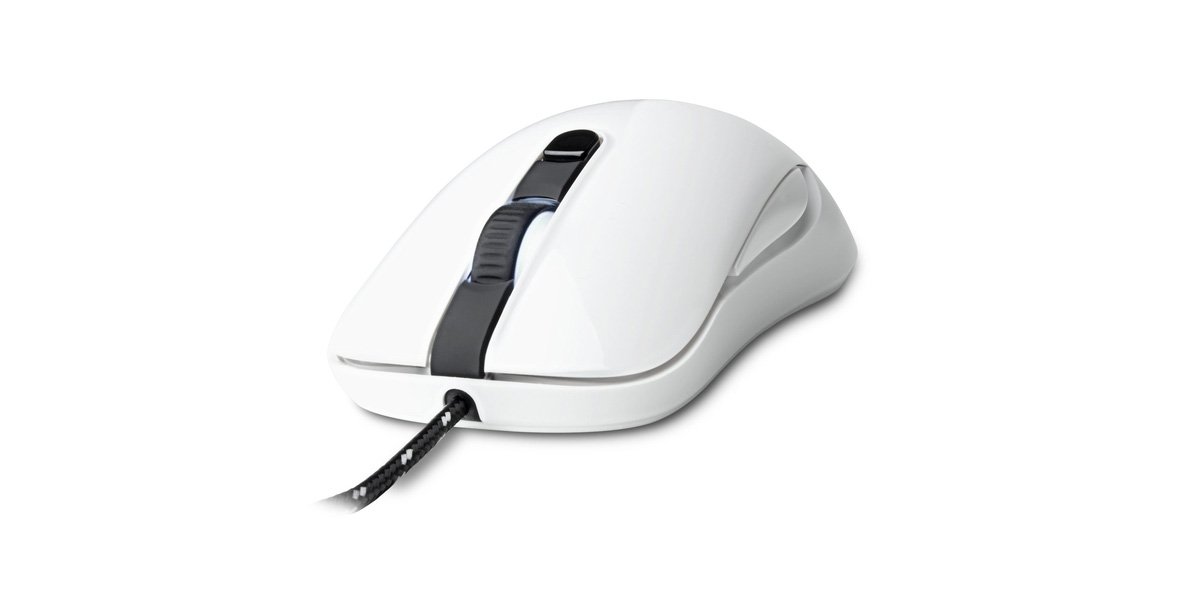
Image of the SteelSeries Kana Optical Gaming Mouse in white, showcasing its ambidextrous design, illuminated scroll wheel, and side buttons.
4. Настройка
4.1 Подключение оборудования
- Найдите свободный порт USB на вашем компьютере.
- Plug the USB connector of the SteelSeries Kana mouse into the USB port.
- Your operating system should automatically detect and install basic drivers for the mouse.
4.2 Software Installation (SteelSeries Engine)
To unlock the full customization potential of your SteelSeries Kana mouse, including CPI settings, button programming, macros, and LED intensity, install the SteelSeries Engine software.
- Visit the official SteelSeries webсайт: Steelseries.com/engine
- Download the SteelSeries Engine software compatible with your operating system (Windows or macOS).
- Для завершения установки следуйте инструкциям на экране.
- Once installed, launch the SteelSeries Engine to configure your mouse settings.
Примечание для пользователей Mac: Compatibility with macOS versions 10.9 and later for SteelSeries Engine 2.0 (required for Kana) has historically been inconsistent. Please check the official SteelSeries website for the latest software updates and compatibility information before installation.
5. Инструкция по эксплуатации
5.1 Базовая функциональность
- Движение: Move the mouse across a surface to control the cursor on your screen.
- Нажатие: Для выполнения основных и дополнительных действий используйте левую и правую кнопки.
- Прокрутка: Rotate the scroll wheel to navigate documents and web pages. Press the scroll wheel for its assigned middle-click function.
5.2 Adjusting CPI (Counts Per Inch)
The centrally located CPI toggle button allows you to switch between two pre-defined sensitivity settings instantly. The default CPI settings are optimized for gaming, but can be customized using the SteelSeries Engine software. The maximum CPI supported is 3200.
- Press the CPI toggle button once to switch to the alternate CPI setting.
- Press it again to revert to the previous setting.
5.3 Customizing with SteelSeries Engine
The SteelSeries Engine software provides extensive customization options:
- CPI Settings: Fine-tune or set custom CPI values beyond the pre-defined options.
- Программирование кнопок: Assign custom functions, keyboard shortcuts, or macros to any of the 6 programmable buttons (including side buttons and scroll wheel click).
- Макросы: Create and assign complex sequences of commands with precise timing control.
- LED Intensity: Adjust the brightness of the illuminated scroll wheel.
- Профиfiles: Создайте и сохраните несколько профессиональныхfiles for different games or applications, with automatic switching based on game triggers.
6. Техническое обслуживание
6.1 Чистка мыши
To ensure optimal performance and longevity, keep your mouse clean.
- Экстерьер: Используйте мягкую, безворсовую ткань, слегкаampДля очистки протрите поверхность мыши водой или слабым чистящим раствором. Избегайте использования агрессивных химикатов или абразивных материалов.
- Оптический датчик: Gently clean the optical sensor lens on the underside of the mouse with a dry cotton swab or compressed air to remove dust or debris.
- Ножки мыши: Ensure the mouse feet are clean and free of obstructions for smooth gliding.
Осторожность: Do not immerse the mouse in water or any cleaning solution. Avoid spraying liquids directly onto the mouse.
7. Поиск Неисправностей
| Проблема | Возможное решение |
|---|---|
| Mouse not detected / Not responding |
|
| Inaccurate or erratic tracking |
|
| Кнопки не реагируют или работают неправильно |
|
| SteelSeries Engine software not recognizing mouse (Mac OS) |
|
8. Технические характеристики
| Бренд | SteelSeries |
| Номер модели | 62029 |
| Цвет | Белый |
| Технология обнаружения движения | Оптический |
| Количество кнопок | 6 (программируемый) |
| Ориентация руки | Ambidextrous (Left, Right) |
| Аппаратная платформа | PC |
| Тип кабеля | Плетеный нейлон |
| Вес товара | 0.16 Килограмма |
| Специальная характеристика | Ergonomic Design, Illuminated Scroll Wheel |
9. Гарантия и поддержка
9.1 Информация о гарантии
The SteelSeries Kana Optical Gaming Mouse comes with a Ограниченная гарантия сроком на 1 год Гарантия действует с даты покупки. Данная гарантия распространяется на производственные дефекты и качество изготовления при нормальной эксплуатации. Она не распространяется на повреждения, вызванные неправильным использованием, несчастными случаями, несанкционированными модификациями или естественным износом. Пожалуйста, сохраните чек о покупке для предъявления гарантийных претензий.
9.2 Поддержка клиентов
For technical assistance, warranty claims, or further information, please visit the official SteelSeries support webсайт:
You can find FAQs, driver downloads, and contact information for customer service on their webсайт.