
1. Введение
This manual provides essential instructions for the safe and efficient operation of your Sharp CD-DH950P 240W Mini-Component System. This system features a 5-disc CD changer, a cassette deck, an iPod/iPhone docking station, a USB host for digital audio playback, and an AM/FM tuner. Please read this manual thoroughly before using the system and retain it for future reference.
2. Информация по технике безопасности
- Источник питания: Подключайте устройство только к розетке переменного тока указанного напряжения.tage.
- Вентиляция: Обеспечьте достаточную вентиляцию. Не закрывайте вентиляционные отверстия.
- Вода и влага: Не подвергайте устройство воздействию дождя, влаги, капель/брызг жидкостей.
- Нагревать: Располагайте устройство вдали от источников тепла, таких как радиаторы, обогреватели, печи и другие приборы, выделяющие тепло.
- Уборка: Перед чисткой отключите устройство от розетки. Используйте мягкую сухую ткань.
- Обслуживание: Не пытайтесь ремонтировать этот продукт самостоятельно. Поручите все обслуживание квалифицированному обслуживающему персоналу.
3. Содержимое упаковки
Убедитесь, что ваш пакет содержит следующие предметы:
- Main Unit (CD-DH950P)
- Левый динамик
- Правый динамик
- Пульт дистанционного управления с батарейками
- Рамочная AM-антенна
- Проволочная антенна FM
- Шнур питания
4. Настройка
4.1 Подключение динамиков
Connect the speaker wires from the main unit to the corresponding terminals on the back of each speaker. Ensure correct polarity (red to red, black to black) for optimal sound quality. The left speaker connects to the left speaker output, and the right speaker to the right speaker output.
4.2 Connecting the Antennas
- FM-антенна: Connect the supplied FM wire antenna to the FM antenna terminal on the rear of the main unit. Extend the wire for better reception.
- АМ-антенна: Connect the supplied AM loop antenna to the AM antenna terminals on the rear of the main unit. Position the antenna for best reception.
4.3 Подключение питания
Plug the power cord into the AC IN jack on the rear of the main unit, then plug the other end into a standard AC wall outlet.
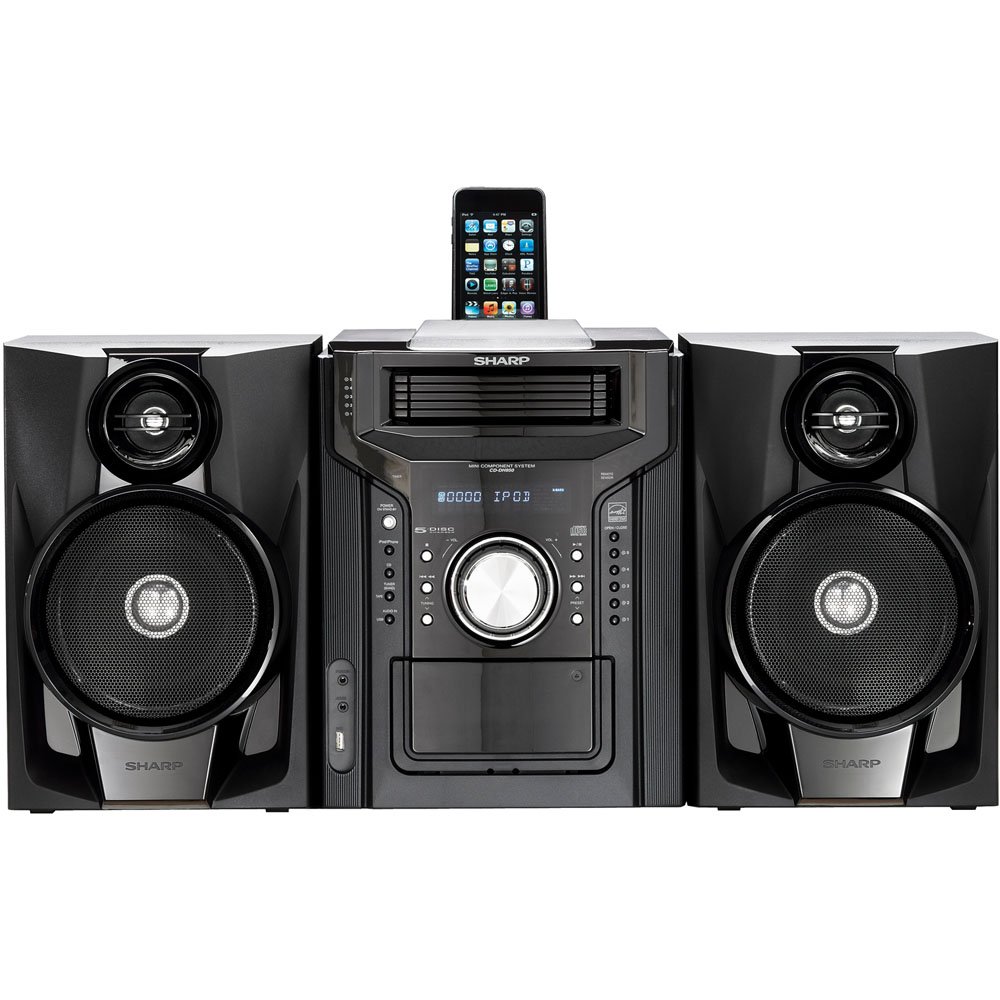
Рисунок 4.3.1: В целом view of the Sharp CD-DH950P Mini-Component System, showing the main unit flanked by two speakers, with an iPhone docked on top of the main unit.
5. Инструкция по эксплуатации
5.1 Включение/выключение питания и регулировка громкости
- Нажмите ВЛАСТЬ кнопку на передней панели или пульте дистанционного управления для включения или выключения устройства.
- Поверните ОБЪЕМ ручку на передней панели или используйте ГРОМКОСТЬ +/- Кнопки на пульте дистанционного управления для регулировки уровня звука.
5.2 Воспроизведение компакт-дисков
This system features a 5-disc CD changer.
- Нажмите ОТКРЫТЬ/ЗАКРЫТЬ кнопку, чтобы открыть лоток для компакт-дисков.
- Place up to five CDs on the disc trays, label side up.
- Нажимать ОТКРЫТЬ/ЗАКРЫТЬ еще раз, чтобы закрыть лоток.
- Нажмите CD кнопка для выбора функции CD.
- Нажмите ВОСПРОИЗВЕДЕНИЕ/ПАУЗА кнопку, чтобы начать воспроизведение.
- Используйте ПРОПУСКАТЬ buttons to navigate between tracks or discs.
5.3 Эксплуатация кассетной деки
- Нажмите TAPE OPEN/CLOSE button to open the cassette deck.
- Вставьте кассету.
- Нажмите ЛЕНТА button to select the cassette function.
- Нажимать ИГРАТЬ чтобы начать воспроизведение.
- To record, ensure the source is selected (e.g., CD, Tuner) and press the ЗАПИСЫВАТЬ button on the cassette deck.
5.4 iPod/iPhone Docking
The system includes a top-mounted docking slot for compatible iPod and iPhone devices (30-pin connector).
- Carefully place your iPod or iPhone into the docking slot.
- The system will automatically switch to iPod/iPhone mode or you may need to press the iPod / iPhone кнопка.
- Use the system's controls or your device's controls to play music. The device will also charge while docked.
5.5 USB Host Playback
Connect a USB storage device containing MP3 or WMA audio fileПодключитесь к USB-порту на передней панели.
- Вставьте USB-устройство в USB-порт.
- Нажмите USB button to select the USB function.
- Use the playback controls to navigate and play files.
5.6 AM/FM тюнер
- Нажмите ТЮНЕР Кнопка для выбора AM или FM радио.
- Используйте НАСТРОЙКА +/- кнопки для ручной настройки на станцию.
- To auto-scan, press and hold the НАСТРОЙКА +/- кнопки.
- To store a preset, tune to the desired station, then press ПАМЯТЬ затем следует заданное число.
5.7 аудиовход
Connect an external audio device (e.g., MP3 player, smartphone) to the AUDIO IN jack on the front panel using a 3.5mm stereo cable.
- Connect your device to the AUDIO IN jack.
- Нажмите АУДИО ВХОД button to select this source.
- Управляйте воспроизведением с подключенного устройства.
6. Техническое обслуживание
6.1 Чистка устройства
Wipe the exterior of the unit with a soft, dry cloth. Do not use abrasive cleaners, waxes, or solvents. Ensure the unit is unplugged before cleaning.
6.2 Уход за компакт-дисками и кассетами
- Handle CDs by their edges to avoid fingerprints and scratches. Clean discs with a soft, lint-free cloth from the center outwards.
- Store cassette tapes away from strong magnetic fields and direct sunlight.
7. Поиск Неисправностей
| Проблема | Возможная причина | Решение |
|---|---|---|
| Нет электричества | Шнур питания не подключен; розетка неисправна. | Убедитесь, что шнур питания надежно вставлен в розетку; попробуйте использовать другую розетку. |
| Нет звука | Слишком низкий уровень громкости; Колонки не подключены; Выбран неправильный источник | Увеличьте громкость; Проверьте подключение динамиков; Выберите правильный источник входного сигнала. |
| CD не воспроизводится | Disc inserted incorrectly; Disc is dirty or scratched | Insert disc correctly (label side up); Clean or replace disc |
| Плохой прием радиосигнала | Антенна расположена неправильно; слабый сигнал | Adjust position of AM/FM antennas; Try auto-tuning or manual fine-tuning |
| iPod/iPhone not charging/playing | Device not properly docked; Device not compatible (e.g., newer connector) | Re-dock the device; Note that this system uses a 30-pin connector, newer devices may require an adapter (not included) |
8. Технические характеристики
- Бренд: Острый
- Модель: CD-DH950P
- Общая выходная мощность: 240 Watts RMS (85W/ch FTC)
- Конфигурация динамиков: 2.1 канала
- Поддерживаемые аудиоформаты: CD, MP3, WMA
- Сигнал-шум: 100 дБ
- Совместимые устройства: MP3 Player, Smartphone (via 30-pin dock or USB/Audio In)
- Размеры (Д x Ш x В): 27.6 x 13.6 x 13.5 дюйма
- Вес товара: 24.4 фунта
- СКП: 074000369863, 074000369290
9. Информация о гарантии
This product is covered by a 1-year limited warranty from the date of purchase. Please refer to the warranty card included with your product for full terms and conditions, or contact Sharp customer service for details.
10 Поддержка
For further assistance, technical support, or service inquiries, please contact Sharp customer service. Contact information can typically be found on the Sharp official webсайте или в документации, прилагаемой к вашему продукту.