
Введение
This manual provides essential information for the safe and efficient operation of your Brookstone iDesign Tower Stereo System. Please read this manual thoroughly before using the product and retain it for future reference.
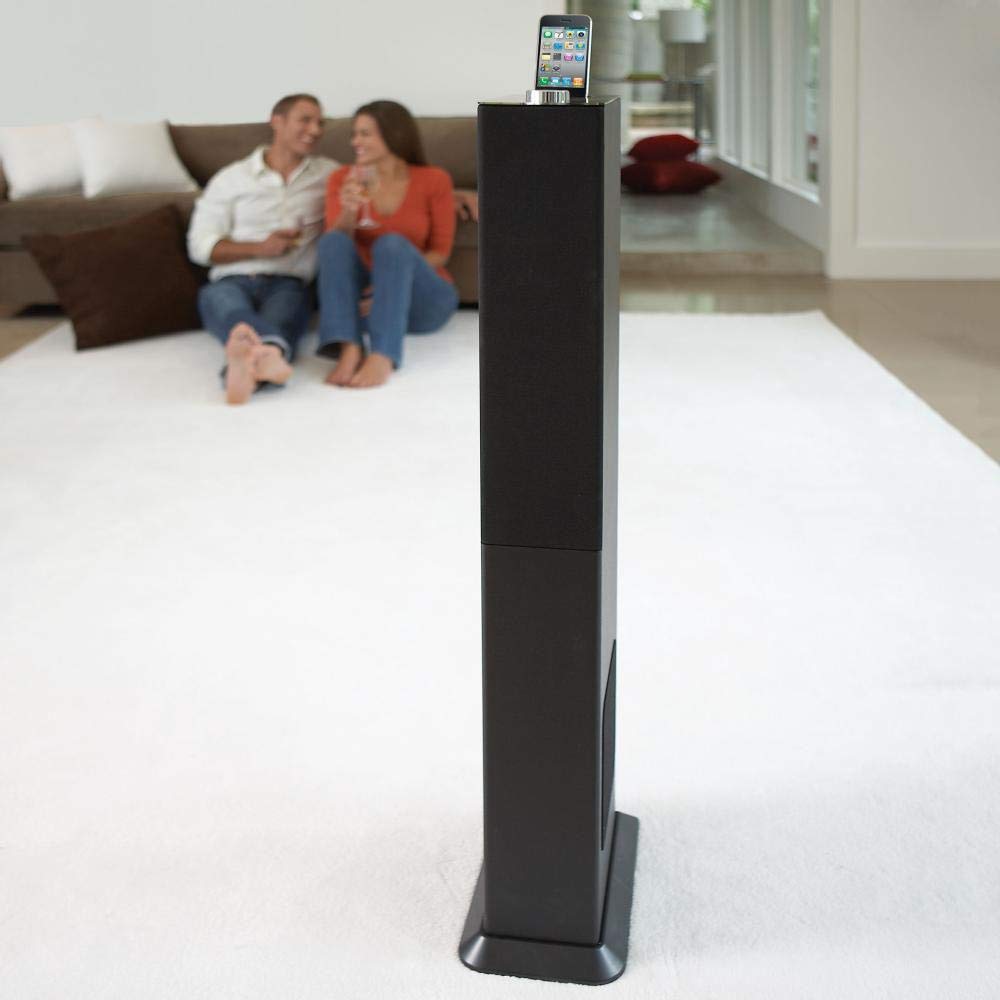
Image: The Brookstone iDesign Tower Stereo System, a tall, slender speaker unit designed for audio playback and device charging.
Информация по безопасности
- Источник питания: Используйте только указанный адаптер питания. Убедитесь, что громкость...tage соответствует вашему местному источнику питания.
- Вентиляция: Не закрывайте вентиляционные отверстия. Устанавливайте в соответствии с инструкциями производителя.
- Вода и влага: Не подвергайте прибор воздействию дождя или влаги. Не ставьте на него предметы, наполненные жидкостью, например, вазы.
- Нагревать: Не устанавливайте вблизи источников тепла, таких как радиаторы, обогреватели, печи или другие приборы (включая amp(жирообразующие вещества), которые вырабатывают тепло.
- Уборка: Чистить только сухой тканью.
- Обслуживание: Поручите все обслуживание квалифицированному обслуживающему персоналу. Обслуживание требуется, если устройство было повреждено каким-либо образом.
Содержимое упаковки
Пожалуйста, проверьте наличие всех предметов в упаковке:
- iDesign Tower Stereo System
- Дистанционное управление
- Адаптер питания
- Руководство пользователя (этот документ)
- Note: iPod/iPhone devices are not included.
Продукт болееview
The iDesign Tower Stereo System features a sleek design with integrated speakers and a docking station for compatible Apple devices. It includes a backlit on/volume knob and a remote control for convenient operation, delivering full, deep bass, crisp, clear highs, and warm middle tones.
Основные компоненты:
- Решетки динамиков: Multi-angled speakers for room-filling sound.
- Docking Port: For iPod and iPhone devices (1st and 2nd generation iPod touch, iPod classic, 4th and 5th generation iPod nano, iPhone 3GS, iPhone 3G, iPhone).
- On/Volume Knob: Backlit control for power and volume adjustment.
- Вспомогательный вход: For connecting other audio devices (cable not included).
- Потребляемая мощность: Для подключения адаптера питания.
- Датчик дистанционного управления: Принимает сигналы от пульта дистанционного управления.
Настраивать
1. Размещение
Place the iDesign Tower Stereo System on a stable, flat surface. Ensure there is adequate space around the unit for proper ventilation. Avoid placing it in direct sunlight or near heat sources.
2. Подключение питания
- Connect the power adapter cable to the Power Input port on the back of the iDesign Tower Stereo System.
- Вставьте адаптер питания в стандартную стенную розетку.
3. Device Docking (iPod/iPhone)
The system is designed for specific iPod and iPhone models:
- iPod touch (1st and 2nd generation)
- iPod классический
- iPod nano (4th and 5th generation)
- iPhone 3GS
- iPhone 3G
- айфон
Carefully align your compatible iPod or iPhone device with the docking port and gently push it down until it is securely seated. The device will begin charging automatically when docked and the system is powered on.
4. Auxiliary Input (Optional)
To connect other audio devices (e.g., MP3 players, CD players) that are not compatible with the docking port, use a 3.5mm audio cable (not included) to connect the device's headphone output to the Auxiliary Input port on the iDesign Tower Stereo System.
Инструкция по эксплуатации
1. Включение/выключение питания
Press the On/Volume knob to turn the system on or off. The knob will illuminate when the system is powered on.
2. Регулятор громкости
Rotate the On/Volume knob clockwise to increase the volume and counter-clockwise to decrease it. You can also adjust the volume using the remote control.
3. Выбор источника
The system automatically detects a docked iPod or iPhone. If an auxiliary device is connected, you may need to select the input source using the remote control (if available) or by cycling through inputs with a dedicated button (refer to remote control section for details).
4. Использование дистанционного управления
The included remote control allows you to manage playback functions (play, pause, skip tracks) and volume for your docked iPod or iPhone from a distance. Point the remote control towards the sensor on the front of the tower system.
5. Зарядные устройства
When a compatible iPod or iPhone is docked and the system is powered on, the device will charge automatically.
Обслуживание
Уборка
Wipe the exterior of the system with a soft, dry cloth. Do not use liquid cleaners or aerosol sprays, as these may damage the finish or internal components. Ensure the system is unplugged before cleaning.
Хранилище
If storing the system for an extended period, unplug it from the power outlet and store it in a cool, dry place, away from direct sunlight and extreme temperatures.
Поиск неисправностей
| Проблема | Возможная причина | Решение |
|---|---|---|
| Нет электричества | Адаптер питания не подключен или розетка не работает. | Ensure power adapter is securely connected to the system and a working wall outlet. |
| Отсутствует звук из подключенного устройства. | Device not properly docked; volume too low; device not playing. | Re-seat the device in the dock. Increase system volume and device volume. Ensure music is playing on the device. |
| No sound from auxiliary input | Auxiliary cable not connected; incorrect source selected; volume too low. | Ensure auxiliary cable is securely connected. Select auxiliary input. Increase system and source device volume. |
| Пульт дистанционного управления не работает | Batteries dead; remote not pointed at sensor; obstruction. | Replace remote control batteries. Point remote directly at the sensor. Remove any obstructions between remote and system. |
| Устройство не заряжается | Device not compatible; system not powered on; device not properly docked. | Verify device compatibility (see Setup section). Ensure system is powered on. Re-seat the device in the dock. |
Технические характеристики
- Модель: B003YB9T2C
- Бренд: Брукстоун
- Размеры упаковки: 42.6 x 14 x 8.6 дюйма
- Вес товара: 28.3 фунта
- Первая доступная версия: 10 марта 2010 г.
- Совместимость: iPod touch (1st/2nd gen), iPod classic, iPod nano (4th/5th gen), iPhone 3GS, iPhone 3G, iPhone.
Гарантия и поддержка
Для получения информации о гарантии и технической поддержке, пожалуйста, ознакомьтесь с документацией, прилагаемой к вашей покупке, или посетите официальный сайт Brookstone. webСохраните чек о покупке для предъявления гарантийных претензий.
"Made for iPod" and "Made for iPhone" mean that an electronic accessory has been designed to connect specifically to iPod or iPhone, respectively, and has been certified by the developer to meet Apple performance standards. Apple is not responsible for the operation of this device or its compliance with safety and regulatory standards. Please note that the use of this accessory with iPod or iPhone may affect wireless performance.