
1. Введение
The Sigma SD14 is a 14-megapixel Digital Single-Lens Reflex (DSLR) camera designed for advanced photographers. It features the Foveon X3 direct-image sensor, which captures full RGB color information at each pixel layer, aiming for high-definition images with rich gradation. This manual provides essential information for setting up, operating, and maintaining your SD14 camera.
Key features include a 2.5-inch LCD monitor, a durable shutter mechanism rated for over 100,000 cycles, a 5-point autofocus system, and continuous shooting capabilities. The camera supports both RAW and JPEG image recording formats and includes Sigma Photo Pro 3.0 software for RAW image processing.

Рисунок 1.1: Передняя часть view of the Sigma SD14 Digital SLR Camera, showing the lens mount and body design.
2. Что в коробке
Verify that all the following items are included in your Sigma SD14 package:
- Sigma SD14 Digital SLR Camera Body
- Lithium-ion Power Battery BP-21
- Battery Charger BC-21
- USB-кабель
- Видео кабель
- Ремешок на шею
- Eye Cap
- Крышка корпуса
- Крышка окуляра
- SIGMA Photo Pro 3.0 CD-ROM
- SD14 Instruction Manual (this document)
3. Настройка
3.1. Зарядка и установка аккумулятора
- Insert the Lithium-ion Battery BP-21 into the Battery Charger BC-21.
- Подключите зарядное устройство к розетке. Загорится индикатор зарядки.
- Для полной зарядки обычно требуется около 120 минут.
- После полной зарядки извлеките аккумулятор из зарядного устройства.
- Open the battery compartment cover on the camera body.
- Вставьте заряженную батарею в отсек, убедившись в правильной ориентации.
- Плотно закройте крышку батарейного отсека.
A fully charged BP-21 battery can capture approximately 500 images.
3.2. Установка карты памяти
The SD14 uses CompactFlash (CF) Type I/II cards. Ensure the card is formatted in the camera before first use.
- Open the CF card slot cover on the side of the camera.
- Insert the CF card with the correct orientation until it clicks into place.
- Close the CF card slot cover securely.
3.3. Установка объектива
The Sigma SD14 uses the Sigma SA Bayonet mount. Only Sigma SA mount lenses are directly compatible.
- Снимите крышку корпуса с камеры и заднюю крышку с объектива.
- Align the red index mark on the lens with the red index mark on the camera body's lens mount.
- Attach the lens by rotating it clockwise until it locks into place with a click.
- Чтобы снять объектив, нажмите кнопку фиксатора объектива на корпусе камеры и поверните объектив против часовой стрелки.
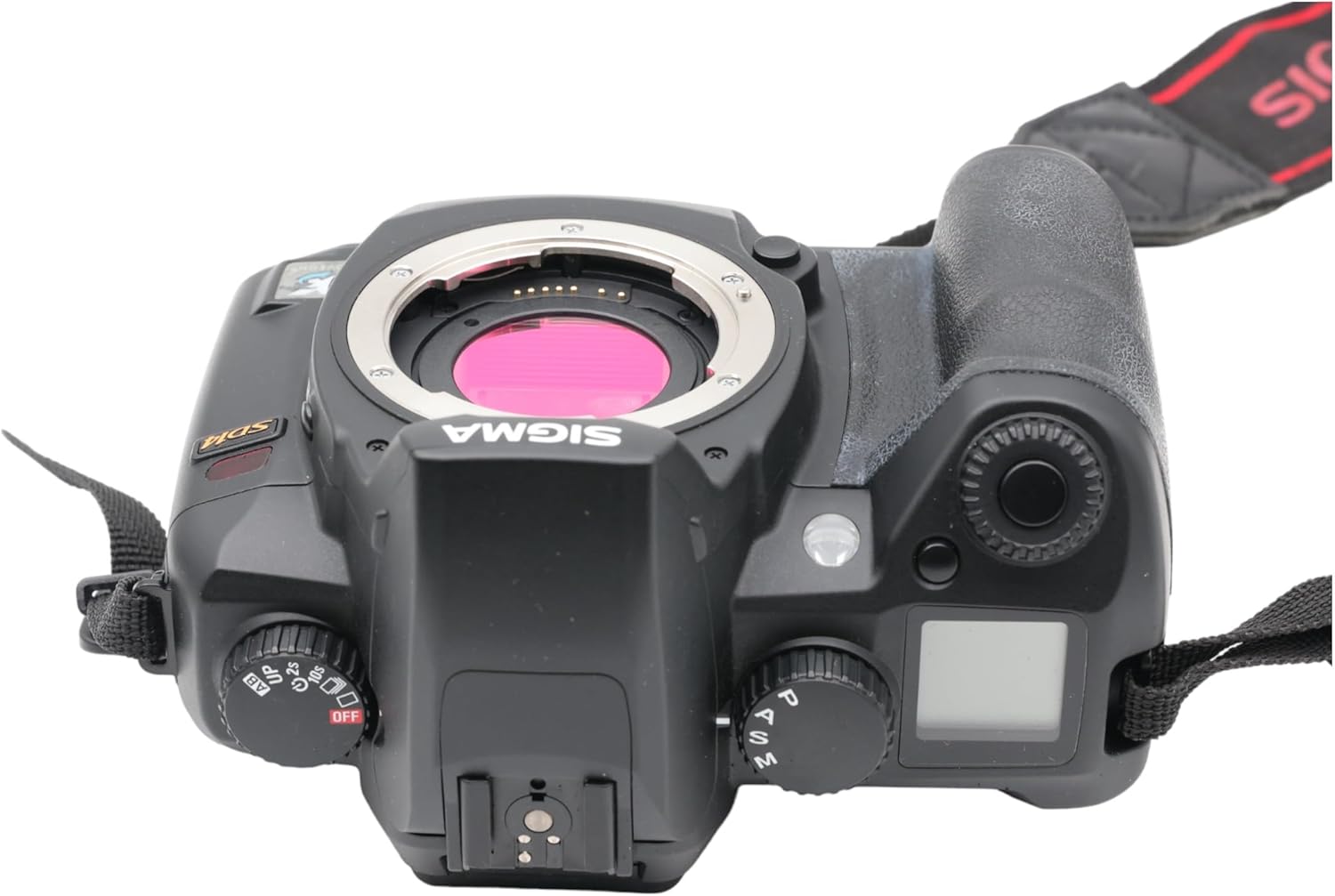
Рисунок 3.1: Вверху view of the Sigma SD14, illustrating the lens mount and mode dials.
4. Операция
4.1. Включение и выключение
Rotate the power switch to the ON position to turn on the camera. Rotate it to OFF to power down.
4.2. Основные элементы управления и дисплей
The SD14 features a 2.5-inch LCD monitor for reviewing images and navigating menus, and a pentaprism viewfinder for composing shots. The top LCD panel displays key settings such as resolution, metering mode, battery status, and remaining shots.

Рисунок 4.1: Сзади view of the Sigma SD14, showing the LCD monitor, viewискатель и кнопки управления.
Key buttons include MENU, ISO, WB (White Balance), and a 4-way controller with an OK button for navigation. The INFO button displays shutter speed, aperture, and other settings on the LCD.
4.3. Фокусировка
The camera utilizes a 5-point autofocus (AF) system (center, left, right, up, and down). The center AF point features a cross-type sensor for enhanced precision. AF point selection can be automatic or manual.
4.4. Режимы измерения
The SD14 offers three metering modes:
- 8-segment Evaluative Metering: Analyzes the entire scene for balanced exposure.
- Center Area Metering: Prioritizes the central area of the frame.
- Center Weighted Average Metering: Measures the entire frame but gives more weight to the central area.
Exposure compensation and auto bracketing functions are available for fine-tuning exposure.
4.5. Запись изображения
The camera supports both RAW (X3F) and JPEG formats. JPEG recording offers four sizes (Super High, High, Medium, Low) and three quality settings (Fine, Normal, Basic).
- Super High (4608 x 3072 pixels): Suitable for A3 or larger prints.
- High (2640 x 1760 pixels): Suitable for A4 prints.
- Medium (1776 x 1184 pixels): Suitable for regular size prints.
- Low (1296 x 864 pixels): Подходит для web pages and email.
4.6. Непрерывная съемка
The SD14 can shoot continuously at 3 frames per second. The number of frames captured in a burst depends on the resolution setting:
- Высокий: 6 кадра
- Середина: 12 кадра
- Низкий: 24 кадра
These figures apply to both RAW and JPEG modes.
4.7 Встроенная вспышка
The built-in flash has a guide number of 11 (ISO 100) and covers a 17mm lens angle (28mm equivalent on 35mm format). It supports S-TTL automatic flash metering and can synchronize with shutter speeds up to 1/180 second.
4.8. Mirror Lock-up
Activate the mirror lock-up mechanism to prevent camera shake caused by mirror movement during exposure. This is particularly useful for macro photography, long telephoto shots, or scientific applications. For best results, use with a remote controller or cable release (sold separately).
4.9. Sigma Photo Pro 3.0 Software
The included Sigma Photo Pro 3.0 software is a RAW image developer. It allows for quick conversion of RAW data and offers three adjustment modes: X3F Mode (original settings), Auto Adjustment Mode, and Custom Mode for manual adjustments (exposure, contrast, shadow, highlight, saturation, sharpness, fill-light). The software supports 8-bit TIFF, 16-bit TIFF, and JPEG file formats, and sRGB, Apple RGB, Adobe RGB, and ColorMatch RGB color spaces.
5. Техническое обслуживание
5.1. Image Sensor Dust Protector
The SD14 features a dust protector positioned in front of the image sensor. This design prevents dust from adhering directly to the sensor, minimizing its impact on image quality. If dust accumulates on the protector, it will be out of focus and generally not visible in images.
5.2. Очистка корпуса и объектива фотоаппарата
- Протирайте корпус камеры мягкой безворсовой тканью. Для удаления стойких загрязнений слегка протрите.ampсмочите ткань водой или мягким чистящим раствором.
- For lenses, use a lens brush to remove loose dust, then a lens cleaning solution and a microfiber cloth. Avoid touching the lens surface with your fingers.
- Never use organic solvents like paint thinner or benzene to clean the camera or lens.
5.3. Уход за аккумулятором
- Когда батарейки не используются, храните их в прохладном сухом месте.
- Чтобы продлить срок службы аккумулятора, избегайте его частой полной разрядки.
- Если камера не будет использоваться в течение длительного времени, извлеките аккумулятор.
6. Поиск Неисправностей
| Проблема | Возможная причина | Решение |
|---|---|---|
| Камера не включается. | Батарея разряжена или неправильно вставлена. | Полностью зарядите аккумулятор и убедитесь, что он правильно вставлен. |
| Изображения размыты. | Неправильная фокусировка, дрожание камеры или грязный объектив. | Убедитесь в правильной фокусировке. Используйте более короткую выдержку или штатив. Очистите объектив. |
| Изображения слишком темные или слишком светлые. | Incorrect exposure settings or metering mode. | Adjust exposure compensation. Select an appropriate metering mode for the scene. |
| Color blotching in underexposed areas. | Characteristic of the Foveon sensor when severely underexposed. | Aim to slightly overexpose images (e.g., +.7 EV) to retain shadow detail and avoid this effect. |
| Cannot record images. | Карта памяти заполнена, заблокирована или вставлена неправильно. | Insert an empty card, unlock the card, or reinsert it correctly. Format the card if necessary (this will erase all data). |
| Камера зависает или перестает реагировать. | Временный сбой программного обеспечения. | Чтобы перезагрузить камеру, извлеките и снова вставьте аккумулятор. |
For more detailed troubleshooting or error codes, please refer to the comprehensive instruction manual included with your camera or visit the Sigma support webсайт.
7. Технические характеристики
| Особенность | Деталь |
|---|---|
| Название модели | СД14 |
| Разрешение фотодатчика | 14 MP (Foveon X3 direct-image sensor) |
| Размер фотодатчика | АПС-С |
| Совместимые крепления | Sigma SA Bayonet |
| Поддерживается File Форматы | JPEG, RAW (X3F), TIFF |
| Размер экрана | 2.5 Inches (150,000 pixels) |
| Viewискатель | Optical Pentaprism (98% coverage, 0.9x magnification) |
| Точки автофокусировки | 5-point (Phase Detection) |
| Скорость непрерывной съемки | 3 кадров в секунду |
| Максимальная скорость затвора | 1/4000 секунды |
| Минимальная скорость затвора | 30 секунд |
| Расширенный диапазон ISO | 100 - 1600 |
| Режимы замера | 8-segment Evaluative, Center Area, Center Weighted Average |
| Built-in Flash Guide Number | 11 (ИСО 100) |
| Носители информации | Compact Flash (CF) Type I/II |
| Источник питания | Lithium-ion Battery BP-21 |
| Связность | USB, видеовыход |
| Вес товара | 1.65 фунта (приблизительно 748 г) |
| Номер модели | С23900 |
| СКП | 085126924416 |
7.1. Дополнительные аксессуары (продаются отдельно)
- Sigma Lenses (over 40 compatible models)
- Flashguns: EF-500 DG SUPER, EF-500 DG ST, EM-140 DG
- Power Grip PG-21
- Cable Release CR-21
- Remote Controller RS-31
- AC Adapter SAC-21
8. Гарантия и поддержка
8.1. Информация о гарантии
For detailed warranty terms and conditions, please refer to the warranty card included with your product or visit the official Sigma webГарантийное покрытие обычно распространяется на дефекты материалов и изготовления в течение определенного периода с даты покупки.
8.2. Поддержка клиентов
If you encounter any issues or have questions not covered in this manual, please contact Sigma customer support. Contact information can usually be found on the official Sigma webсайте или в гарантийной документации.
Интернет-ресурсы: Visit the official Sigma website for product registration, firmware updates, FAQs, and additional support resources.