
1. Введение
The Rane RS-1 is a dedicated external power supply designed to provide reliable 120VAC power to a range of compatible Rane audio products. This manual provides essential information for the safe and correct setup, operation, and maintenance of your RS-1 power supply.
Please read this manual thoroughly before using the product to ensure proper function and to prevent damage to the unit or connected equipment.
2. Информация по технике безопасности
- Источник питания: Connect the RS-1 only to a 120VAC, 60Hz power outlet. Ensure the outlet is properly grounded.
- Вентиляция: Do not block any ventilation openings. Ensure adequate airflow around the power supply.
- Влага: Do not expose the unit to rain, moisture, or excessive humidity. Keep liquids away from the power supply.
- Нагревать: Не размещайте устройство вблизи источников тепла, таких как радиаторы, обогреватели, печи и другие приборы, выделяющие тепло.
- кабели: Не допускайте, чтобы на шнур питания наступали или защемляли его, особенно в местах расположения вилок, розеток и в местах выхода из устройства.
- Обслуживание: Не пытайтесь ремонтировать этот продукт самостоятельно. Поручите все обслуживание квалифицированному обслуживающему персоналу.
- Отключение: Unplug the power supply from the wall outlet during lightning storms or when unused for long periods.
3. Настройка
Follow these steps to correctly set up your Rane RS-1 Power Supply:
- Определите совместимое устройство: Ensure your Rane audio product requires the RS-1 power supply and has the appropriate RJ-45 style power input port.
- Подключиться к устройству: Carefully insert the RJ-45 style connector from the RS-1 power supply into the designated power input port on your Rane audio device. Ensure a secure connection.
- Подключитесь к розетке: Plug the two-prong AC power cord of the RS-1 into a standard 120VAC, 60Hz wall outlet.
- Включение питания: Once connected, your Rane audio device should receive power. Refer to your Rane audio device's manual for specific power-on procedures.
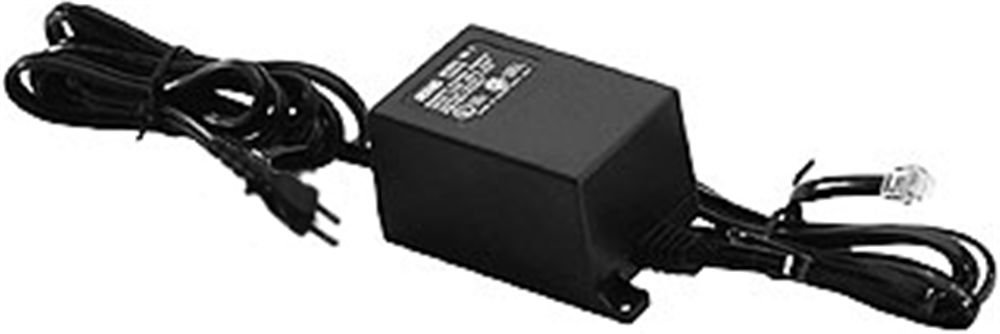
Image: Rane RS-1 Power Supply. This image displays the Rane RS-1 Power Supply, a black rectangular unit with an attached power cord featuring a two-prong North American plug on one end and an RJ-45 style connector on the other, designed to provide power to compatible Rane audio equipment.
4. Инструкция по эксплуатации
The Rane RS-1 is an external power supply that operates automatically once connected to a power source and a compatible Rane device. It does not have user-adjustable controls.
- Ensure all connections are firm before applying power.
- The power supply is designed for continuous operation within its specified voltagе и ватtagэлектронные пределы.
- Always disconnect the power supply from the wall outlet before disconnecting it from the Rane audio device, especially if the device does not have its own power switch.
5. Техническое обслуживание
The Rane RS-1 Power Supply requires minimal maintenance. Follow these guidelines to ensure longevity:
- Уборка: Disconnect the power supply from the wall outlet before cleaning. Use a soft, dry cloth to wipe the exterior. Do not use liquid cleaners or aerosol sprays.
- Инспекция: Periodically inspect the power cord and connectors for any signs of damage, fraying, or loose connections. If damage is observed, discontinue use and seek professional servicing.
- Хранилище: Если блок питания не используется в течение длительного времени, храните его в прохладном, сухом месте, вдали от прямых солнечных лучей и экстремальных температур.
6. Поиск Неисправностей
If you encounter issues with your Rane RS-1 Power Supply, refer to the following common troubleshooting steps:
| Проблема | Возможная причина | Решение |
|---|---|---|
| No power to connected Rane device. |
|
|
| Прерывистое электропитание. |
|
|
If these steps do not resolve the issue, contact Rane customer support or a qualified service technician.
7. Технические характеристики
| Модель | RS1 |
| Бренд | Ране |
| Vol входtage | 120 В переменного тока |
| Источник питания | AC |
| Ватtage | 1000 Вт |
| Питание Тип штепсельной вилки | Тип А - 2 контакта (североамериканский) |
| Вес товара | 1.3 фунтов (0.59 кг) |
| Размеры | (Not specified in data) |
| СКП | 687499101045 |
| ASIN | B0002IU02S |
8. Compatible Rane Devices
The Rane RS-1 Power Supply is compatible with the following Rane audio products:
- АС 22Б
- АС 23Б
- AD 22d
- АП 13
- AVA 22d
- КП 52
- КП 64
- DA 216a
- ДА 26
- DC 24
- ДМС 22
- GE 130
- GE 215
- GE 30
- HC 4
- HC 6
- МЛМ 42
- MLM 82a
- MM 8z
- Депутат 2
- MP 22z
- MP 24z
- Депутат 2016
- МС 1б
- ЧП 17
- ПС 1
- РА 30
- СМ 26Б
- С.М. 82
- СРМ 66
- ЮЮЭ 35
- ТНХ 22
- ТНХ 44
- TTM 54i
- ТТМ 56
- VP 12
9. Гарантия и поддержка
For information regarding warranty coverage, product registration, or technical support, please refer to the official Rane website or contact Rane customer service directly. Keep your purchase receipt as proof of purchase for warranty claims.
Rane Official Webсайт: www.rane.com